> ## Documentation Index
> Fetch the complete documentation index at: https://docs.domino.ai/llms.txt
> Use this file to discover all available pages before exploring further.
# Provision GCP infrastructure
A Domino install can’t be hosted on a subdomain of another Domino install. For example, if you have Domino deployed at `data-science.example.com`, you can’t deploy another instance of Domino at `acme.data-science.example.com`.
Use this topic to provision infrastructure with [Google Cloud Platform (GCP)](https://cloud.google.com/docs/overview). After the infrastructure is in place, you can deploy Domino on [Google Kubernetes Engine (GKE)](https://cloud.google.com/kubernetes-engine/docs/concepts/kubernetes-engine-overview).
## Orchestrate the installation
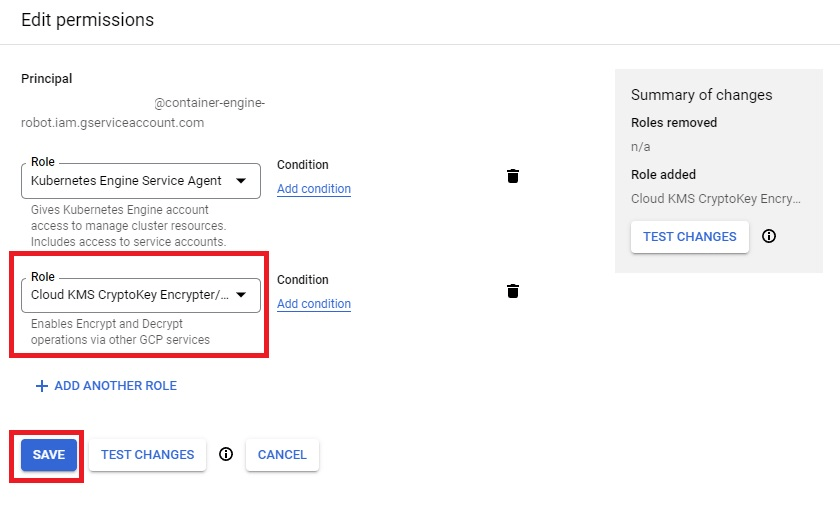
1. In the GCP console, go to **Identity and Access Management services (IAM)** and select **Include Google-provided role grants**. Filter by **Kubernetes Engine Service Agent** and click the pencil icon.
 2. Add the **Cloud KMS CryptoKey Encrypter/Decrypter** role to the service principal.
 ## Provision your infrastructure with Domino’s Terraform module
Domino recommends that you use our public-facing [GCP-specific Reference Terraform module](https://github.com/dominodatalab/terraform-gcp-gke). You can also reference this module to manually provision the environment and infrastructure.
1. Open the `main.tf` [file](/attachments/6.3/gke-main.tf) then go to the `gke_cluster` module, and edit the attributes as follow:
* `gke_cluster.project`: Name of the project where the cluster will be deployed.
* `gke_cluster.deploy_id`: Name of the cluster to create.
* `gke_cluster.location`: Location of the cluster.
* `gke_cluster.master_authorized_networks_config.cidr_block`: External network that can access Kubernetes master through HTTPS. Must be specified in Classless Inter-Domain Routing (CIDR) notation.
* `gke_cluster.node_pool_overrides.gpu.node_locations`: Location of the GPU nodes.
2. To initialize the modules, run the following command in the same folder as `main.tf`:
```shell theme={null}
gcloud init
gcloud auth application-default login
terraform init
```
3. To start the infrastructure deployment, run the following commands (you can ignore deprecation warnings):
```shell theme={null}
terraform plan -out=terraform.plan
terraform apply terraform.plan
```
Save the Terraform output from the previous commands because you’ll need it to complete the Domino deployment.
## Provision your infrastructure with Domino’s Terraform module
Domino recommends that you use our public-facing [GCP-specific Reference Terraform module](https://github.com/dominodatalab/terraform-gcp-gke). You can also reference this module to manually provision the environment and infrastructure.
1. Open the `main.tf` [file](/attachments/6.3/gke-main.tf) then go to the `gke_cluster` module, and edit the attributes as follow:
* `gke_cluster.project`: Name of the project where the cluster will be deployed.
* `gke_cluster.deploy_id`: Name of the cluster to create.
* `gke_cluster.location`: Location of the cluster.
* `gke_cluster.master_authorized_networks_config.cidr_block`: External network that can access Kubernetes master through HTTPS. Must be specified in Classless Inter-Domain Routing (CIDR) notation.
* `gke_cluster.node_pool_overrides.gpu.node_locations`: Location of the GPU nodes.
2. To initialize the modules, run the following command in the same folder as `main.tf`:
```shell theme={null}
gcloud init
gcloud auth application-default login
terraform init
```
3. To start the infrastructure deployment, run the following commands (you can ignore deprecation warnings):
```shell theme={null}
terraform plan -out=terraform.plan
terraform apply terraform.plan
```
Save the Terraform output from the previous commands because you’ll need it to complete the Domino deployment.