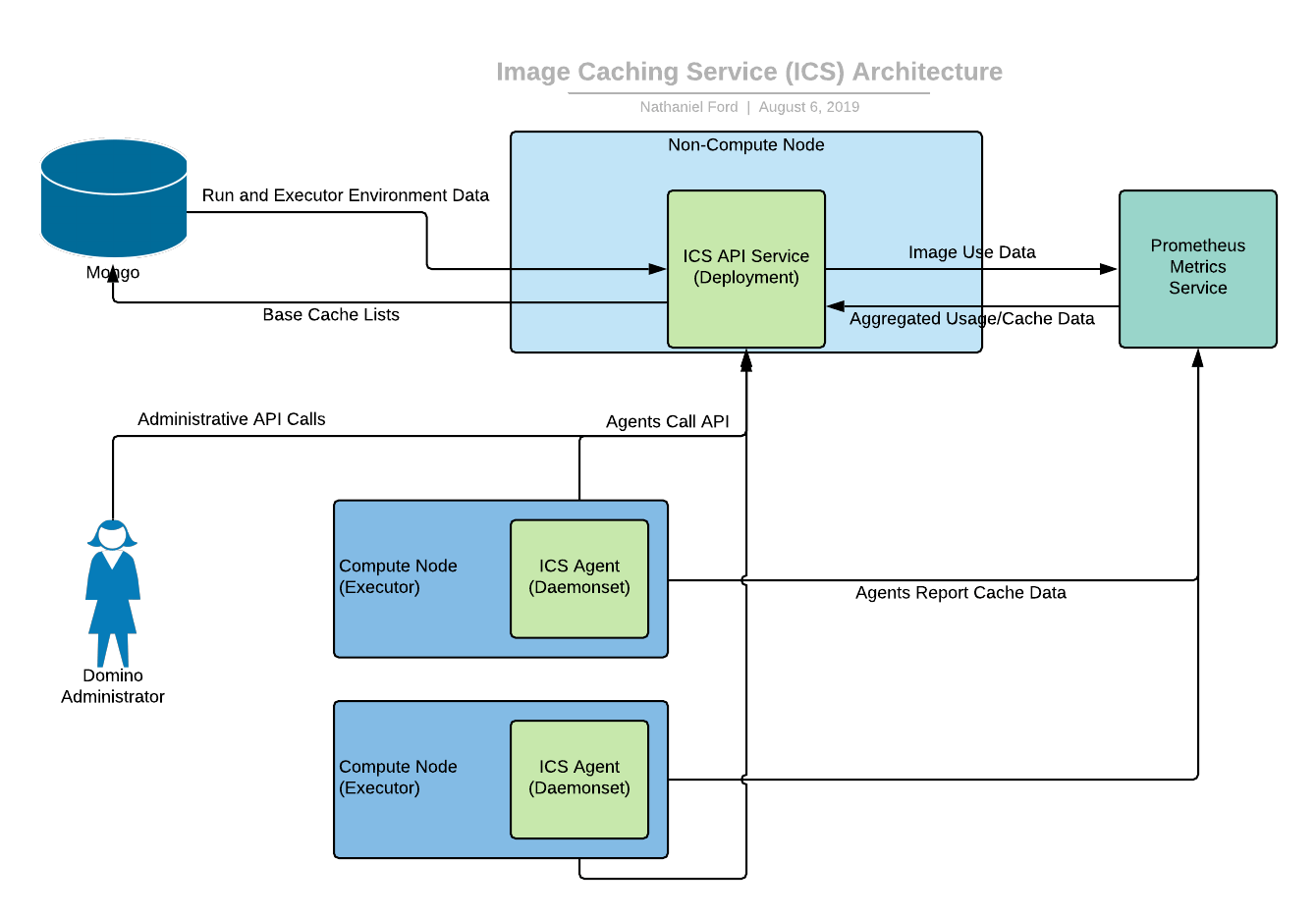
 ICS has two primary components: the API Service and the Agent.
The ICS Agent runs on each compute node, monitors disk usage, removes unneeded images and calls the API service to get a recommended list of images to cache. It then proactively attempts to download and load these images, within certain constraints.
The ICS API Service provides a list of recommended images to cache. This is built off a base list of images to always cache or never cache, that the administrators can specify. On top of this, a list of images the API Service believes are likely to be used is added, in a priority order. It queries the Domino MongoDB collections to find out the top images used within the last two weeks. The base cache list and other metadata are stored in the Domino Mongo database.
The agent runs under certain constraints:
* It will not download images if the amount of disk space allotted for the cache has been used (10% of the compute node disk).
* It will not download images if the node it is on is currently executing an image pull or a run.
* It will not download images if the cpu is being used passed a certain point. (Docker images are CPU intensive to load).
When the agent runs, pruning occurs before caching.
## ICS update instructions
Here are the steps to modify the list of images used by the image caching service.
1. Using `kubectl`, find a running `image-cache-api` pod:
```bash theme={null}
image-cache-api-7748fdf4d-8s2tg 1/1 Running 0 31m
image-cache-api-7748fdf4d-kdbhq 1/1 Running 0 31m
image-cache-api-7748fdf4d-s42gj 1/1 Running 0 31m
```
2. `exec` into one of these pods:
```bash theme={null}
kubectl exec -it -n domino-platform image-cache-api-7748fdf4d-8s2tg -- bash
```
3. Within the pod, verify connectivity to the image caching API endpoint:
```bash theme={null}
bash-5.2$ curl -u agent:$ICS_API_TOKEN localhost:5000/base_list
{"base_list":[{"cache":"always","image":"670838783587.dkr.ecr.us-west-2.amazonaws.com/domino/domino-standard-environment:ubuntu22-py3.10-r4.4-domino6.0-standard"}],"status":"Success","tier":"default"}
```
The `$ICS_API_TOKEN` environment variable is pre-populated within the pod and doesn’t need to be set.
The base list shows the images that should always be in the ICS cache.
4. Check the current image cache:
```bash theme={null}
bash-5.2$ curl -u agent:$ICS_API_TOKEN localhost:5000/image_cache
{"cache_list":[{"cache":"always","image":"670838783587.dkr.ecr.us-west-2.amazonaws.com/domino/domino-standard-environment:ubuntu22-py3.10-r4.4-domino6.0-standard"},{"cache":"preferred","image":"670838783587.dkr.ecr.us-west-2.amazonaws.com/domino/domino-core-environment:ubuntu22-py3.10-domino6.0-core"},{"cache":"preferred","image":"quay.io/domino/domino-standard-environment:ubuntu22-py3.10-r4.4-domino5.11-standard"},{"cache":"preferred","image":"quay.io/domino/domino-standard-environment:develop.latest"},{"cache":"preferred","image":"quay.io/domino/field:domino-apro-2024-2025"},{"cache":"preferred","image":"670838783587.dkr.ecr.us-west-2.amazonaws.com/domino/domino-standard-environment:ubuntu22-py3.10-r4.4-domino6.0-standard"}],"generated":"2025-06-10 19:34:57.124511","tiers":[]}
```
5. Updates can be made by sending a POST to this endpoint:
Example:
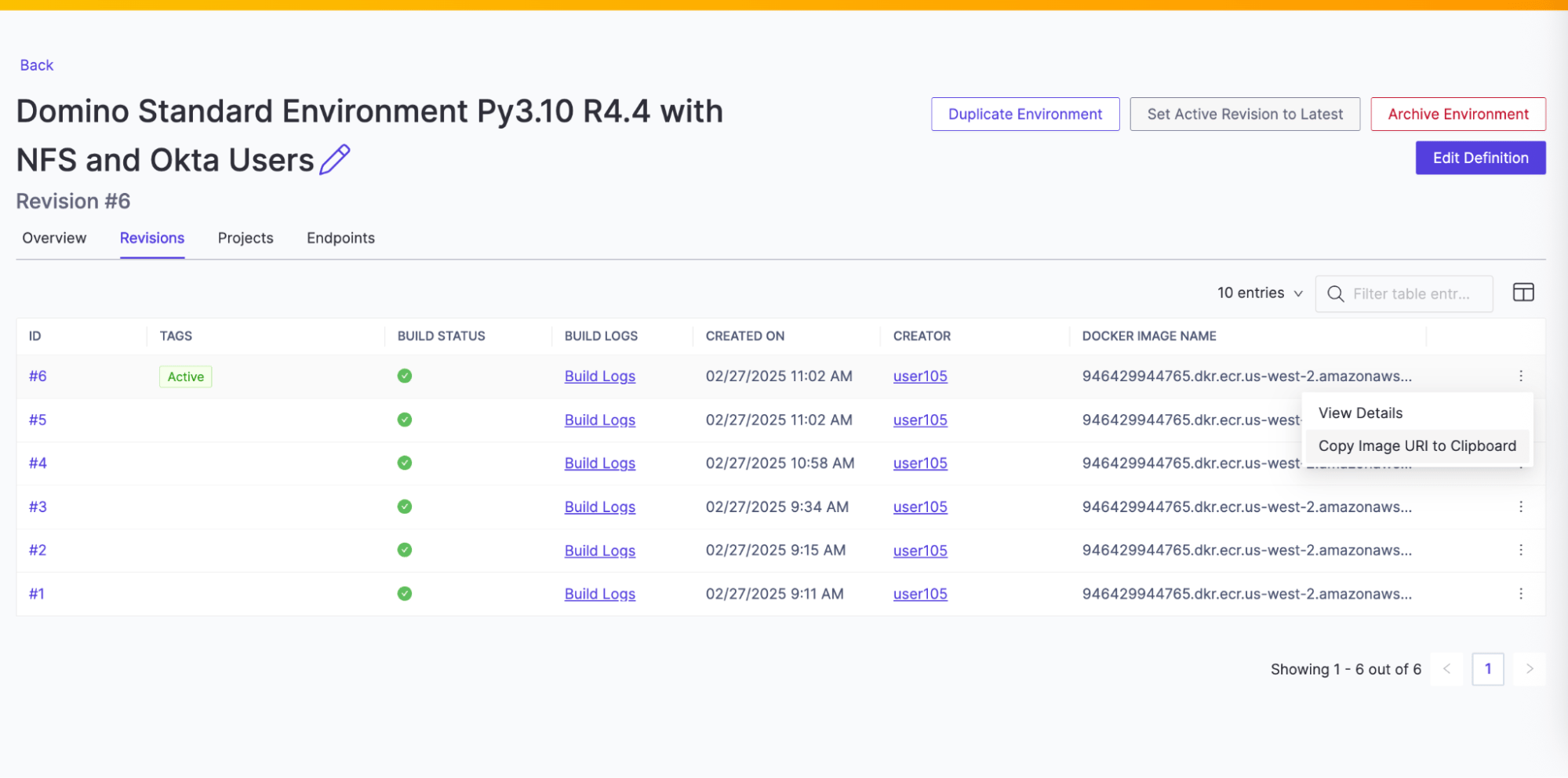
Add the `946429944765.dkr.ecr.us-west-2.amazonaws.com/wgamage73590/environment:67c0728cca19ba5c32ecd109-6` into the ICS.
Note that `-6` refers to the revision number 6 of the compute environment `946429944765.dkr.ecr.us-west-2.amazonaws.com/wgamage73590/environment:67c0728cca19ba5c32ecd109`
ICS has two primary components: the API Service and the Agent.
The ICS Agent runs on each compute node, monitors disk usage, removes unneeded images and calls the API service to get a recommended list of images to cache. It then proactively attempts to download and load these images, within certain constraints.
The ICS API Service provides a list of recommended images to cache. This is built off a base list of images to always cache or never cache, that the administrators can specify. On top of this, a list of images the API Service believes are likely to be used is added, in a priority order. It queries the Domino MongoDB collections to find out the top images used within the last two weeks. The base cache list and other metadata are stored in the Domino Mongo database.
The agent runs under certain constraints:
* It will not download images if the amount of disk space allotted for the cache has been used (10% of the compute node disk).
* It will not download images if the node it is on is currently executing an image pull or a run.
* It will not download images if the cpu is being used passed a certain point. (Docker images are CPU intensive to load).
When the agent runs, pruning occurs before caching.
## ICS update instructions
Here are the steps to modify the list of images used by the image caching service.
1. Using `kubectl`, find a running `image-cache-api` pod:
```bash theme={null}
image-cache-api-7748fdf4d-8s2tg 1/1 Running 0 31m
image-cache-api-7748fdf4d-kdbhq 1/1 Running 0 31m
image-cache-api-7748fdf4d-s42gj 1/1 Running 0 31m
```
2. `exec` into one of these pods:
```bash theme={null}
kubectl exec -it -n domino-platform image-cache-api-7748fdf4d-8s2tg -- bash
```
3. Within the pod, verify connectivity to the image caching API endpoint:
```bash theme={null}
bash-5.2$ curl -u agent:$ICS_API_TOKEN localhost:5000/base_list
{"base_list":[{"cache":"always","image":"670838783587.dkr.ecr.us-west-2.amazonaws.com/domino/domino-standard-environment:ubuntu22-py3.10-r4.4-domino6.0-standard"}],"status":"Success","tier":"default"}
```
The `$ICS_API_TOKEN` environment variable is pre-populated within the pod and doesn’t need to be set.
The base list shows the images that should always be in the ICS cache.
4. Check the current image cache:
```bash theme={null}
bash-5.2$ curl -u agent:$ICS_API_TOKEN localhost:5000/image_cache
{"cache_list":[{"cache":"always","image":"670838783587.dkr.ecr.us-west-2.amazonaws.com/domino/domino-standard-environment:ubuntu22-py3.10-r4.4-domino6.0-standard"},{"cache":"preferred","image":"670838783587.dkr.ecr.us-west-2.amazonaws.com/domino/domino-core-environment:ubuntu22-py3.10-domino6.0-core"},{"cache":"preferred","image":"quay.io/domino/domino-standard-environment:ubuntu22-py3.10-r4.4-domino5.11-standard"},{"cache":"preferred","image":"quay.io/domino/domino-standard-environment:develop.latest"},{"cache":"preferred","image":"quay.io/domino/field:domino-apro-2024-2025"},{"cache":"preferred","image":"670838783587.dkr.ecr.us-west-2.amazonaws.com/domino/domino-standard-environment:ubuntu22-py3.10-r4.4-domino6.0-standard"}],"generated":"2025-06-10 19:34:57.124511","tiers":[]}
```
5. Updates can be made by sending a POST to this endpoint:
Example:
Add the `946429944765.dkr.ecr.us-west-2.amazonaws.com/wgamage73590/environment:67c0728cca19ba5c32ecd109-6` into the ICS.
Note that `-6` refers to the revision number 6 of the compute environment `946429944765.dkr.ecr.us-west-2.amazonaws.com/wgamage73590/environment:67c0728cca19ba5c32ecd109`
 ```bash theme={null}
curl -u bash-5.2$ curl -u agent:$ICS_API_TOKEN -XPOST localhost:5000/base_list/add -H 'Content-Type: application/json' -d'{"image": {"image": "946429944765.dkr.ecr.us-west-2.amazonaws.com/wgamage73590/environment:67c0728cca19ba5c32ecd109-6", "cache": "always"}}'
{"added":"946429944765.dkr.ecr.us-west-2.amazonaws.com/wgamage73590/environment:67c0728cca19ba5c32ecd109-6","status":"Success"}
```
6. Checking the base list again should now show this entry:
```bash theme={null}
bash-5.2$ curl -u agent:$ICS_API_TOKEN localhost:5000/base_list
{"base_list":[{"cache":"always","image":"670838783587.dkr.ecr.us-west-2.amazonaws.com/domino/domino-standard-environment:ubuntu22-py3.10-r4.4-domino6.0-standard"},{"cache":"always","image":"946429944765.dkr.ecr.us-west-2.amazonaws.com/wgamage73590/environment:67c0728cca19ba5c32ecd109-6"}],"status":"Success","tier":"default"}
```
7. Check the current image cache:
```bash theme={null}
bash-5.2$ curl -u agent:$ICS_API_TOKEN localhost:5000/image_cache
{"cache_list":[{"cache":"always","image":"670838783587.dkr.ecr.us-west-2.amazonaws.com/domino/domino-standard-environment:ubuntu22-py3.10-r4.4-domino6.0-standard"},{"cache":"always","image":"946429944765.dkr.ecr.us-west-2.amazonaws.com/wgamage73590/environment:67c0728cca19ba5c32ecd109-6"},{"cache":"preferred","image":"670838783587.dkr.ecr.us-west-2.amazonaws.com/domino/domino-core-environment:ubuntu22-py3.10-domino6.0-core"},{"cache":"preferred","image":"quay.io/domino/domino-standard-environment:ubuntu22-py3.10-r4.4-domino5.11-standard"},{"cache":"preferred","image":"quay.io/domino/domino-standard-environment:develop.latest"},{"cache":"preferred","image":"quay.io/domino/field:domino-apro-2024-2025"},{"cache":"preferred","image":"670838783587.dkr.ecr.us-west-2.amazonaws.com/domino/domino-standard-environment:ubuntu22-py3.10-r4.4-domino6.0-standard"}],"generated":"2025-06-10 19:40:07.215065","tiers":[]}
```
## API syntax
```bash theme={null}
curl -u bash-5.2$ curl -u agent:$ICS_API_TOKEN -XPOST localhost:5000/base_list/add -H 'Content-Type: application/json' -d'{"image": {"image": "946429944765.dkr.ecr.us-west-2.amazonaws.com/wgamage73590/environment:67c0728cca19ba5c32ecd109-6", "cache": "always"}}'
{"added":"946429944765.dkr.ecr.us-west-2.amazonaws.com/wgamage73590/environment:67c0728cca19ba5c32ecd109-6","status":"Success"}
```
6. Checking the base list again should now show this entry:
```bash theme={null}
bash-5.2$ curl -u agent:$ICS_API_TOKEN localhost:5000/base_list
{"base_list":[{"cache":"always","image":"670838783587.dkr.ecr.us-west-2.amazonaws.com/domino/domino-standard-environment:ubuntu22-py3.10-r4.4-domino6.0-standard"},{"cache":"always","image":"946429944765.dkr.ecr.us-west-2.amazonaws.com/wgamage73590/environment:67c0728cca19ba5c32ecd109-6"}],"status":"Success","tier":"default"}
```
7. Check the current image cache:
```bash theme={null}
bash-5.2$ curl -u agent:$ICS_API_TOKEN localhost:5000/image_cache
{"cache_list":[{"cache":"always","image":"670838783587.dkr.ecr.us-west-2.amazonaws.com/domino/domino-standard-environment:ubuntu22-py3.10-r4.4-domino6.0-standard"},{"cache":"always","image":"946429944765.dkr.ecr.us-west-2.amazonaws.com/wgamage73590/environment:67c0728cca19ba5c32ecd109-6"},{"cache":"preferred","image":"670838783587.dkr.ecr.us-west-2.amazonaws.com/domino/domino-core-environment:ubuntu22-py3.10-domino6.0-core"},{"cache":"preferred","image":"quay.io/domino/domino-standard-environment:ubuntu22-py3.10-r4.4-domino5.11-standard"},{"cache":"preferred","image":"quay.io/domino/domino-standard-environment:develop.latest"},{"cache":"preferred","image":"quay.io/domino/field:domino-apro-2024-2025"},{"cache":"preferred","image":"670838783587.dkr.ecr.us-west-2.amazonaws.com/domino/domino-standard-environment:ubuntu22-py3.10-r4.4-domino6.0-standard"}],"generated":"2025-06-10 19:40:07.215065","tiers":[]}
```
## API syntax
| Path | Use |
|---|---|
`GET |
Indicates current status; `ok` means ICS is healthy. |
`GET |
Returns a list of images to prune or cache. |
`GET |
Takes the parameter `tier`, and returns the currently configured base list for that tier. |
`POST |
Takes the parameter and a json block. The json is stored as the base list for the service. Note that **always** and **never** can be used to require or block a specific image. **preferred** will have no particular effect. Any number of images may be included. `tier` is optional and will be **default** if unset. |
`POST |
Takes the parameter `tier` and a json block, adding the single image to the base\_list. Note that **always** and **never** can be used to require or block a specific image. **preferred** will have no particular effect. `tier` is optional and will be **default** if unset. |
`POST |
Functions exactly the same as `add`, but will remove an image instead. |