> ## Documentation Index
> Fetch the complete documentation index at: https://docs.domino.ai/llms.txt
> Use this file to discover all available pages before exploring further.
# Set up Posit Package Manager integration
As a Domino admin, you can configure one or more [Posit Package Manager (PPM) servers](/6.3/platform-capabilities/core-concepts/workspaces/use-posit-package-manager) from the Admin panel. You’ll provide the server’s connection details and can optionally restrict which repositories users are allowed to search from their workspace.
## Prerequisites
Before configuring a PPM server, make sure the following are in place:
* A network-accessible PPM server
* A configured API key for the PPM server
* A Domino environment with an `update.R` script located at `/home/ubuntu` that includes the `manage_renv_environment()` function. This script should handle:
* Package installation
* `renv` updates and snapshots
* Any logic needed to meet GxP compliance requirements
## Configure a new PPM server
These steps show you how to use the Admin panel to connect to a PPM server:
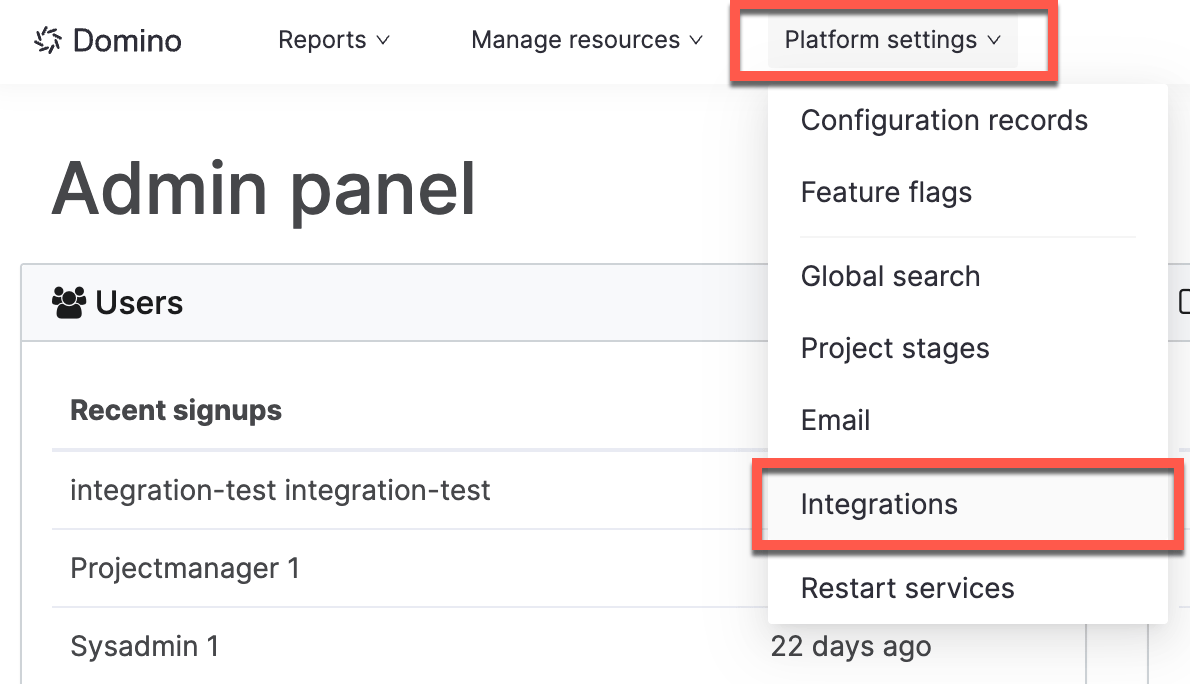
1. Open the **Admin panel** and go to **Platform settings** > **Integrations**.
 2. Under **Posit Package Manager**, click **Add PPM Server** in the top right.
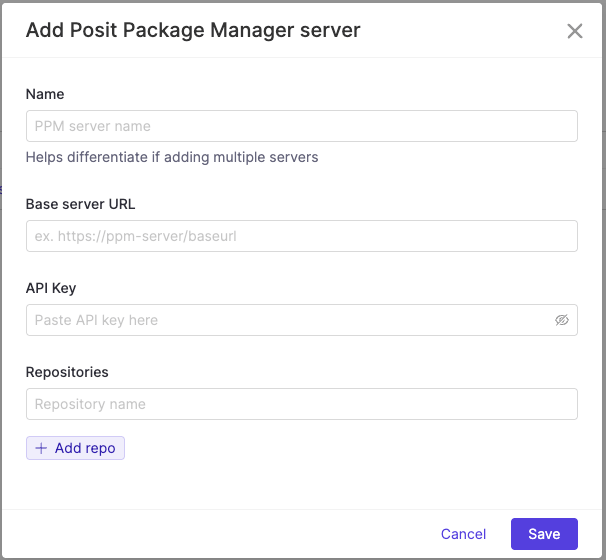
3. Fill in the required server details: **Name**, **Base Server URL**, and **API Key**.
2. Under **Posit Package Manager**, click **Add PPM Server** in the top right.
3. Fill in the required server details: **Name**, **Base Server URL**, and **API Key**.
 4. To restrict snapshots by repository:
1. In the **Repositories** field, list the repository names you want users to search within.
2. If left blank, users will see snapshot results from all repositories available on the server.
## Next steps
* Learn more about [Platform management](/6.3/admin/platform-configuration).
4. To restrict snapshots by repository:
1. In the **Repositories** field, list the repository names you want users to search within.
2. If left blank, users will see snapshot results from all repositories available on the server.
## Next steps
* Learn more about [Platform management](/6.3/admin/platform-configuration).