> ## Documentation Index
> Fetch the complete documentation index at: https://docs.domino.ai/llms.txt
> Use this file to discover all available pages before exploring further.
# Work with NetApp Volumes
Domino Volumes for NetApp ONTAP (NetApp Volumes) offer a native integration with NetApp’s enterprise-grade storage system. Mount storage from NetApp ONTAP filesystems directly into Domino workloads.
NetApp Volumes cover nearly the same ground as [Domino Datasets](/6.3/platform-capabilities/core-concepts/data/datasets), and the Domino Data team recommends them wherever your organization runs ONTAP. Their [snapshots](https://docs.netapp.com/us-en/ontap/concepts/snapshot-copies-concept.html) are the main reason:
* **Near-instant, regardless of size**: a snapshot of 100 GB or more completes in about 3 seconds, where a Dataset snapshot takes anywhere from seconds to hours as the data grows.
* **No extra storage to start**: ONTAP uses redirect-on-write, so a snapshot initially consumes no extra space. A Dataset snapshot duplicates the data it captures at the moment you take it.
Cloning is the one thing Datasets do that NetApp Volumes don't: you can create a new Dataset from a Dataset snapshot, but you can't clone a NetApp Volume snapshot into a new NetApp Volume.
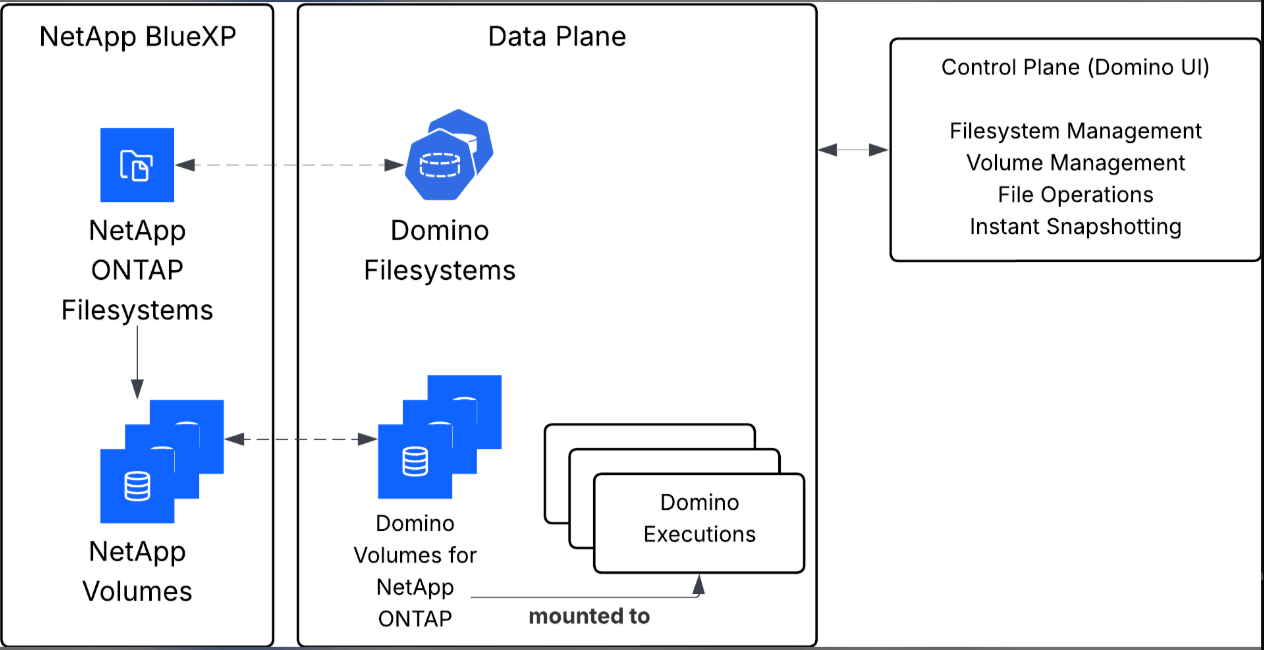 NetApp Volumes suit multi-terabyte and larger datasets that need high availability and enterprise backup and recovery. They are not as quick to start with as a Dataset: they require NetApp ONTAP infrastructure, and an administrator registers an ONTAP Filesystem in Domino first. Once that is done, you work with them from the same **Data** menu as Datasets. They aren't version-controlled by Domino, and there are limits on the number of snapshots per NetApp Volume and NetApp Volumes per filesystem.
Domino sets no size limit on a NetApp Volume. The ceiling comes from ONTAP and depends on the volume type: a single traditional FlexVol supports up to 300 TiB. Check [NetApp's ONTAP documentation](https://docs.netapp.com/us-en/ontap/volumes/index.html) for the limits that apply to your filesystem.
A NetApp ONTAP Filesystem connects a Data Plane and Kubernetes storage class to a named storage container for NetApp Volumes. The ONTAP Filesystem offers:
* Clear visibility into where NetApp Volumes are stored.
* Support for multiple accounts and Data Planes, which is essential given the per-account limits on NetApp Volume creation.
* Improved deletion flow by allowing NetApp Volumes to be moved to cold storage, instead of being permanently deleted.
This helps enforce retention policies and reduces the risk of accidental data loss.
## What you can do
[Create NetApp Volumes](/6.3/platform-capabilities/core-concepts/data/netapp-volumes/create-netapp-volumes)\
Create and configure new NetApp Volumes from Domino or the context of a specific project.
* Set up the NetApp Volume name, description, and access roles.
* Choose snapshot and synchronization options.
[Manage NetApp Volume access in Projects](/6.3/platform-capabilities/core-concepts/data/netapp-volumes/add-remove-netapp-volumes)\
Add or remove existing NetApp Volumes from any project:
* Attach NetApp Volumes to enable data access within the project.
* Detach NetApp Volumes when no longer needed or to restrict access.
[Understand NetApp Volume roles](/6.3/platform-capabilities/core-concepts/data/netapp-volumes/view-and-edit-netapp-volumes)\
Learn about the built-in role types and their permissions:
* **Owner**: Full control, including permission editing, deletion requests, and creating instantaneous snapshots.
* **Editor**: Can modify descriptions, manage shared access, and read and write access.
* **Reader**: View-only access to the NetApp Volume’s contents.
[Version data with Snapshots](/6.3/platform-capabilities/core-concepts/data/datasets/version-data-with-snapshots)\
Domino lets you create snapshots of both NetApp Volumes and Domino Datasets to support reproducibility, version control, and collaboration.
[View and edit NetApp Volume details](/6.3/platform-capabilities/core-concepts/data/netapp-volumes/view-and-edit-netapp-volumes)\
Access your list of NetApp Volumes where you have permissions:
* View NetApp Volume metadata and configuration.
* Edit description and permissions (Owner or Editor only).
[Request NetApp Volume deletion](/6.3/platform-capabilities/core-concepts/data/netapp-volumes/add-remove-netapp-volumes#delete-a-netapp-volume)\
If a NetApp Volume is no longer needed:
* Delete the NetApp Volume or submit a deletion request to your Domino administrator.
* Ensure the NetApp Volume is no longer attached to active projects or in use by users.
## Related topics
- [Manage NetApp Volumes](/6.3/admin/data-administration/netapp-volumes/index.md)
- [Add or remove NetApp Volumes on Projects](/6.3/platform-capabilities/core-concepts/data/netapp-volumes/add-remove-netapp-volumes.md)
- [View and edit NetApp Volumes](/6.3/platform-capabilities/core-concepts/data/netapp-volumes/view-and-edit-netapp-volumes.md)
- [Domino NetApp Volumes API](/6.3/reference/api/domino-volumes-api.md)
NetApp Volumes suit multi-terabyte and larger datasets that need high availability and enterprise backup and recovery. They are not as quick to start with as a Dataset: they require NetApp ONTAP infrastructure, and an administrator registers an ONTAP Filesystem in Domino first. Once that is done, you work with them from the same **Data** menu as Datasets. They aren't version-controlled by Domino, and there are limits on the number of snapshots per NetApp Volume and NetApp Volumes per filesystem.
Domino sets no size limit on a NetApp Volume. The ceiling comes from ONTAP and depends on the volume type: a single traditional FlexVol supports up to 300 TiB. Check [NetApp's ONTAP documentation](https://docs.netapp.com/us-en/ontap/volumes/index.html) for the limits that apply to your filesystem.
A NetApp ONTAP Filesystem connects a Data Plane and Kubernetes storage class to a named storage container for NetApp Volumes. The ONTAP Filesystem offers:
* Clear visibility into where NetApp Volumes are stored.
* Support for multiple accounts and Data Planes, which is essential given the per-account limits on NetApp Volume creation.
* Improved deletion flow by allowing NetApp Volumes to be moved to cold storage, instead of being permanently deleted.
This helps enforce retention policies and reduces the risk of accidental data loss.
## What you can do
[Create NetApp Volumes](/6.3/platform-capabilities/core-concepts/data/netapp-volumes/create-netapp-volumes)\
Create and configure new NetApp Volumes from Domino or the context of a specific project.
* Set up the NetApp Volume name, description, and access roles.
* Choose snapshot and synchronization options.
[Manage NetApp Volume access in Projects](/6.3/platform-capabilities/core-concepts/data/netapp-volumes/add-remove-netapp-volumes)\
Add or remove existing NetApp Volumes from any project:
* Attach NetApp Volumes to enable data access within the project.
* Detach NetApp Volumes when no longer needed or to restrict access.
[Understand NetApp Volume roles](/6.3/platform-capabilities/core-concepts/data/netapp-volumes/view-and-edit-netapp-volumes)\
Learn about the built-in role types and their permissions:
* **Owner**: Full control, including permission editing, deletion requests, and creating instantaneous snapshots.
* **Editor**: Can modify descriptions, manage shared access, and read and write access.
* **Reader**: View-only access to the NetApp Volume’s contents.
[Version data with Snapshots](/6.3/platform-capabilities/core-concepts/data/datasets/version-data-with-snapshots)\
Domino lets you create snapshots of both NetApp Volumes and Domino Datasets to support reproducibility, version control, and collaboration.
[View and edit NetApp Volume details](/6.3/platform-capabilities/core-concepts/data/netapp-volumes/view-and-edit-netapp-volumes)\
Access your list of NetApp Volumes where you have permissions:
* View NetApp Volume metadata and configuration.
* Edit description and permissions (Owner or Editor only).
[Request NetApp Volume deletion](/6.3/platform-capabilities/core-concepts/data/netapp-volumes/add-remove-netapp-volumes#delete-a-netapp-volume)\
If a NetApp Volume is no longer needed:
* Delete the NetApp Volume or submit a deletion request to your Domino administrator.
* Ensure the NetApp Volume is no longer attached to active projects or in use by users.
## Related topics
- [Manage NetApp Volumes](/6.3/admin/data-administration/netapp-volumes/index.md)
- [Add or remove NetApp Volumes on Projects](/6.3/platform-capabilities/core-concepts/data/netapp-volumes/add-remove-netapp-volumes.md)
- [View and edit NetApp Volumes](/6.3/platform-capabilities/core-concepts/data/netapp-volumes/view-and-edit-netapp-volumes.md)
- [Domino NetApp Volumes API](/6.3/reference/api/domino-volumes-api.md)