> ## Documentation Index
> Fetch the complete documentation index at: https://docs.domino.ai/llms.txt
> Use this file to discover all available pages before exploring further.
# Nexus hybrid architecture
Domino Nexus provides a hybrid architecture that enables you to deploy workloads across multiple Kubernetes clusters, including in multiple cloud regions, cloud providers, or on-premises.
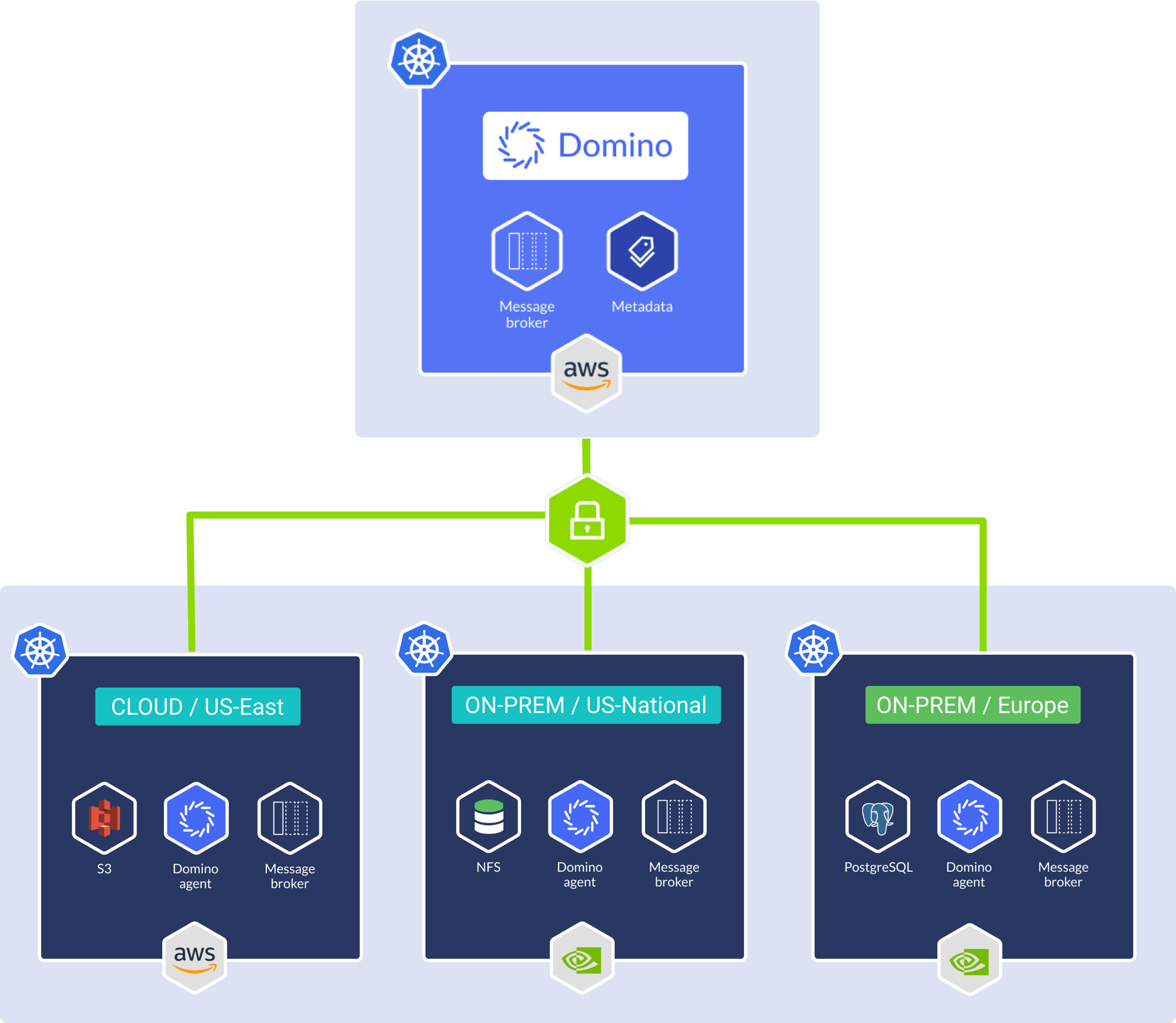 A Domino Nexus deployment consists of a “control plane”, which is a Kubernetes cluster hosting Domino platform services (above, light blue), and many “data planes” (above, dark blue) which are distinct Kubernetes clusters that run a small set of Domino services and are used for executing user workloads.
The Domino control plane is also capable of executing user workloads in what is called the “local” data plane. This allows for the continued use of Domino features which are not yet supported for remote data planes.
This Domino feature is not available in *remote* data planes: Starburst-powered data sources
The `local` data plane (hosted in the control plane) supports the full range of Domino features.
Your Domino field representative can help you enable Domino Nexus in your deployment. Once it is enabled, you can [manage your data planes](/cloud/admin/platform-configuration/manage-data-planes) and your Domino users can [use data planes](/cloud/platform-capabilities/core-concepts/zones/domino-nexus).
## Connectivity
A Domino Nexus deployment consists of a “control plane”, which is a Kubernetes cluster hosting Domino platform services (above, light blue), and many “data planes” (above, dark blue) which are distinct Kubernetes clusters that run a small set of Domino services and are used for executing user workloads.
The Domino control plane is also capable of executing user workloads in what is called the “local” data plane. This allows for the continued use of Domino features which are not yet supported for remote data planes.
This Domino feature is not available in *remote* data planes: Starburst-powered data sources
The `local` data plane (hosted in the control plane) supports the full range of Domino features.
Your Domino field representative can help you enable Domino Nexus in your deployment. Once it is enabled, you can [manage your data planes](/cloud/admin/platform-configuration/manage-data-planes) and your Domino users can [use data planes](/cloud/platform-capabilities/core-concepts/zones/domino-nexus).
## Connectivity
 User connectivity to Domino Nexus consists primarily of a browser connection to the Domino control plane. For Domino Workspaces, the user connects directly to the data plane where the workspace is running. This avoids the possibility of proxying sensitive or region-locked data through the control plane.
 ## Supported Kubernetes versions
Domino validates its software on various Kubernetes versions. Note the following:
* Nexus **control planes** have the same Kubernetes cluster requirements as any other Domino deployment.
* Nexus **data planes** have the same requirements, except:
* There is no requirement for shared storage (RWX storage class).
* Only one (compute) namespace is required.
* Ingress configuration is different (see [Enable a Data Plane for Workspaces](/cloud/admin/platform-configuration/manage-data-planes/enable-data-plane)).
## Control plane load balancers
Domino control planes expose these services to data planes:
* RabbitMQ
* Vault
* Docker Registry (unless external registry is used)
* Domino API
With the exception of the Domino API, a load balancer must be configured to allow ingress to these services from data planes.
There are a number of important security considerations; see [Control plane security guidance](/cloud/admin/security-and-compliance/control-plane-security).
## Supported Kubernetes versions
Domino validates its software on various Kubernetes versions. Note the following:
* Nexus **control planes** have the same Kubernetes cluster requirements as any other Domino deployment.
* Nexus **data planes** have the same requirements, except:
* There is no requirement for shared storage (RWX storage class).
* Only one (compute) namespace is required.
* Ingress configuration is different (see [Enable a Data Plane for Workspaces](/cloud/admin/platform-configuration/manage-data-planes/enable-data-plane)).
## Control plane load balancers
Domino control planes expose these services to data planes:
* RabbitMQ
* Vault
* Docker Registry (unless external registry is used)
* Domino API
With the exception of the Domino API, a load balancer must be configured to allow ingress to these services from data planes.
There are a number of important security considerations; see [Control plane security guidance](/cloud/admin/security-and-compliance/control-plane-security).