> ## Documentation Index
> Fetch the complete documentation index at: https://docs.domino.ai/llms.txt
> Use this file to discover all available pages before exploring further.
# Compute Environment Variables
Compute Environment variables provide user, project, and hardware information. These are set at the environment level and used for new revisions.
Environment variables help configure how the system runs and manage secrets or settings across different areas.
## Navigate to environment variables screen
There are two ways to navigate to your environment to add variables.
**Option 1 - From your project**:
1. Open your **Project** and click **Settings**.
2. Click **Manage Environment** > **Edit Definition**.
**Option 2 - From Domino Overview**:
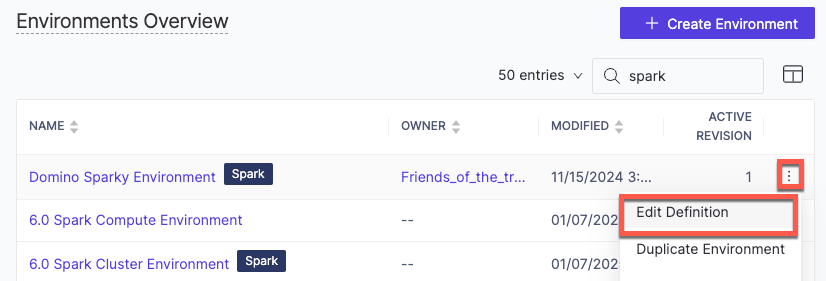
1. Open Domino and click **Govern** > **Environments**.
2. From **Environments Overview**, scroll to locate your Environment.
3. Click the three dots and choose **Edit Definition**.
 ## Add compute environment variables
On the **Edit Definition** page, scroll down to the **Environment variables** section.
## Add compute environment variables
On the **Edit Definition** page, scroll down to the **Environment variables** section.
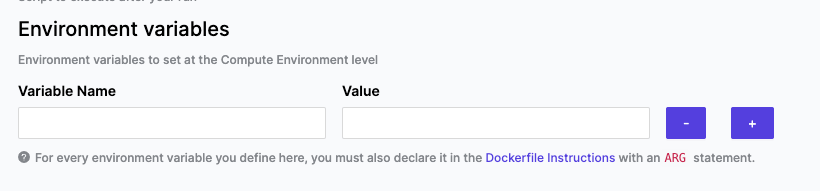 1. Click the plus icon and add the following:
1. **Variable Name**: Enter the variable name. For example, API\_KEY.
2. **Value**: Enter a value for the variable. The maximum length for a value is 64K.
2. Declare the variable in the Dockerfile instructions with an ARG statement. [Docker’s official site](https://docs.docker.com/engine/reference/builder/) has more detailed information about Docker.
3. Click **Build** after entering new variables and updating the Dockerfile instruction.
## Next Steps
* [Our Best Practices](/cloud/platform-capabilities/core-concepts/compute-environments/manage-compute-environments/1-best-practices-domino-environments) will guide you in setting up and maintaining your Domino environments.
* [Set up user environment variables](/cloud/platform-capabilities/core-concepts/compute-environments/manage-compute-environments/manage-environment-variables/4-setup-user-environment-variables) for each user. The system injects these variables at execution time for any run initiated by that user.
* Learn to [create model variables](/cloud/platform-capabilities/core-concepts/compute-environments/manage-compute-environments/manage-environment-variables/3-create-model-variables) to add, modify, or delete variables for your models.
* The [Default Domino Variables](/cloud/platform-capabilities/core-concepts/compute-environments/manage-compute-environments/manage-environment-variables/5-glossary-default-variables) glossary contains details about variables automatically injected by Domino.
1. Click the plus icon and add the following:
1. **Variable Name**: Enter the variable name. For example, API\_KEY.
2. **Value**: Enter a value for the variable. The maximum length for a value is 64K.
2. Declare the variable in the Dockerfile instructions with an ARG statement. [Docker’s official site](https://docs.docker.com/engine/reference/builder/) has more detailed information about Docker.
3. Click **Build** after entering new variables and updating the Dockerfile instruction.
## Next Steps
* [Our Best Practices](/cloud/platform-capabilities/core-concepts/compute-environments/manage-compute-environments/1-best-practices-domino-environments) will guide you in setting up and maintaining your Domino environments.
* [Set up user environment variables](/cloud/platform-capabilities/core-concepts/compute-environments/manage-compute-environments/manage-environment-variables/4-setup-user-environment-variables) for each user. The system injects these variables at execution time for any run initiated by that user.
* Learn to [create model variables](/cloud/platform-capabilities/core-concepts/compute-environments/manage-compute-environments/manage-environment-variables/3-create-model-variables) to add, modify, or delete variables for your models.
* The [Default Domino Variables](/cloud/platform-capabilities/core-concepts/compute-environments/manage-compute-environments/manage-environment-variables/5-glossary-default-variables) glossary contains details about variables automatically injected by Domino.