> ## Documentation Index
> Fetch the complete documentation index at: https://docs.domino.ai/llms.txt
> Use this file to discover all available pages before exploring further.
# Store Project credentials
When you need to connect your code to things like databases or Amazon S3, don’t put passwords or secret keys directly in your source code.
Instead, use environment variables to keep sensitive info safe. This way, you can:
* Share source files without sharing credentials.
* Keep credentials out of version control systems like Git or Domino.
* Let only privileged users (like the project owner) change sensitive variables.
If sensitive values like credentials are stored in your source code, anyone who can change the code can access it. So, Domino suggests keeping this info separate and injecting it when the code runs with environment variables.
## Store environment variables in a secret store
Project environment variables can be stored in a secure credential store.
You must be the project owner to add, modify, or delete environment variables.
1. Go to the **Settings** tab on the project.
2. In the **Environment variables** section, add the key/value pairs to inject as environment variables:
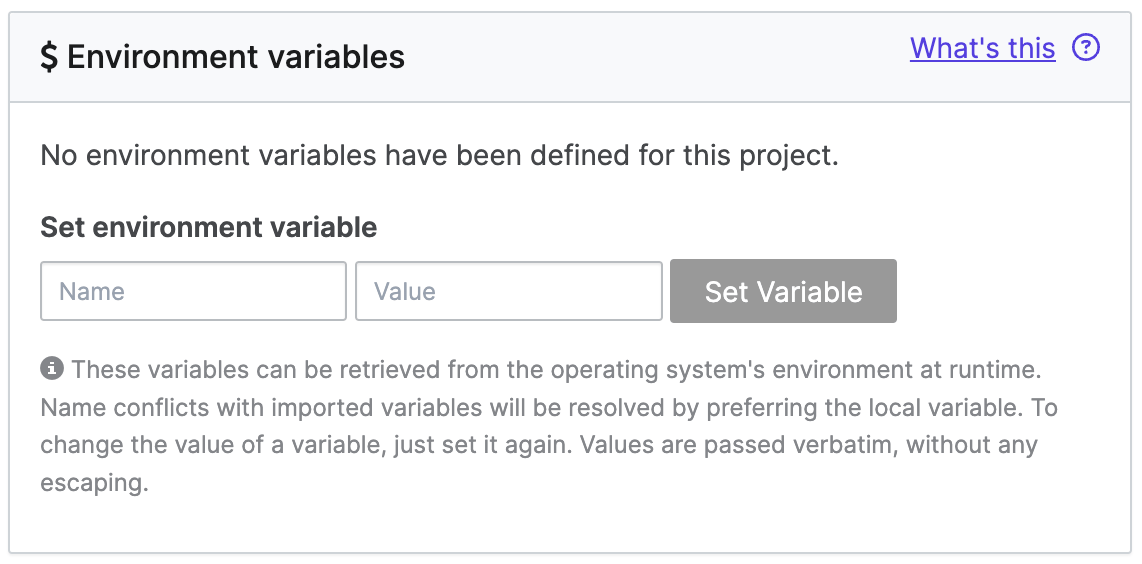 The values are passed verbatim, so escaping is not required. The value has a 64K length limit.
All collaborators in a project can see the environment variable values.
## Next steps
* Learn how to [define and inject environment variables](/cloud/platform-capabilities/core-concepts/compute-environments/manage-compute-environments/manage-environment-variables) for Projects, Models, and users.
The values are passed verbatim, so escaping is not required. The value has a 64K length limit.
All collaborators in a project can see the environment variable values.
## Next steps
* Learn how to [define and inject environment variables](/cloud/platform-capabilities/core-concepts/compute-environments/manage-compute-environments/manage-environment-variables) for Projects, Models, and users.