> ## Documentation Index
> Fetch the complete documentation index at: https://docs.domino.ai/llms.txt
> Use this file to discover all available pages before exploring further.
# LLM Gateway
Use Domino’s AI Gateway to access multiple external Large Language Model (LLM) providers securely within your Workspaces and Runs. The AI Gateway serves as a bridge between Domino and external LLM providers such as OpenAI or AWS Bedrock. By routing requests through the AI Gateway, Domino ensures that all interactions with external LLMs are secure, monitored, and compliant with organizational policies. This guide outlines how to use the AI Gateway to connect to LLM services while adhering to security and auditability best practices.
The AI Gateway provides:
* **Security**: Ensures that all data sent to and received from LLM providers is encrypted and secure.
* **Auditability**: Keeps comprehensive logs of all LLM interactions, which is crucial for compliance and monitoring.
* **Ease of access**: Provides a centralized point of access to multiple LLM providers, simplifying the user experience.
* **Control**: Allows administrators to manage and restrict access to LLM providers based on user roles and project needs.
The AI Gateway is built on top of an [MLflow Deployments Server](https://mlflow.org/docs/latest/llms/deployments/index.html#supported-provider-models) for easy integration with existing MLflow projects.
## Get started using the AI Gateway
You can access AI Gateway endpoints from the Domino platform and also from within a Domino Workspace.
### Access AI Gateway endpoints in Domino
To view AI Gateway endpoints in Domino:
1. In the top navigation pane, go to **Develop** > **Gateway LLMs**.
2. Search for endpoints using basic information like the name, type, provider, or model.
### Access AI Gateway endpoints from a Workspace
To see the AI Gateway endpoints available to use in your Workspace:
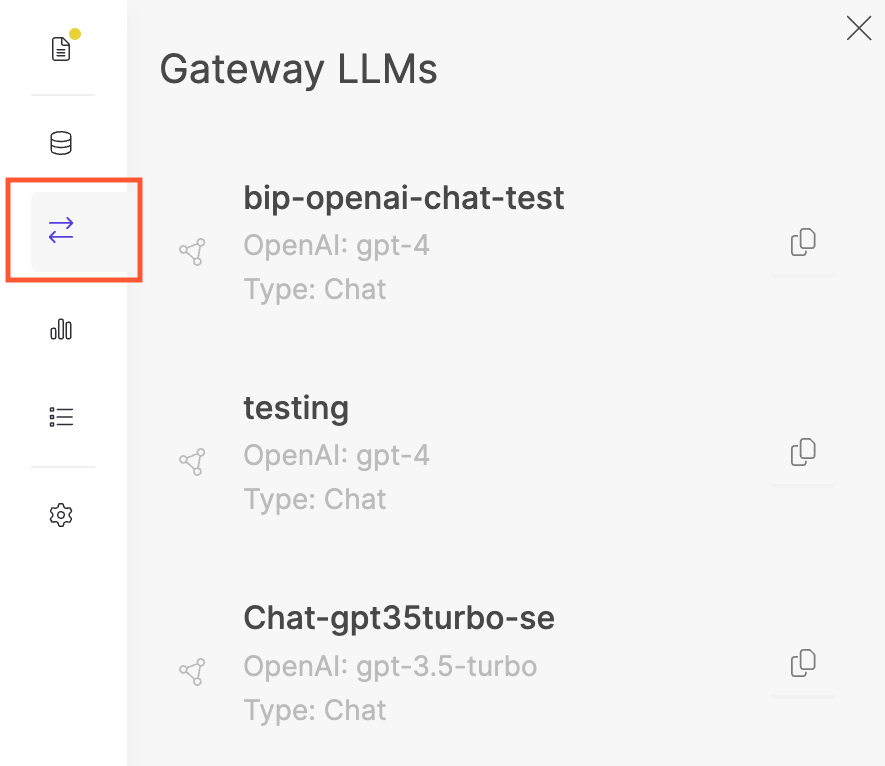
* Create a new Workspace and open the **Gateway LLMs** side panel.
 ### Query an endpoint
To query an endpoint:
1. Click on the **Copy Code** icon.
2. Paste the code in your Workspace and adjust the query to fit your needs.
Alternatively, you can use the [MLflow Deployment Client API](https://mlflow.org/docs/latest/python_api/mlflow.deployments.html#mlflow.deployments.MlflowDeploymentClient) to create your own query.
When using the MLflow Deployment Client, Domino supports `predict()`, `get_endpoint()`, and `list_endpoints()` API endpoints.
## Configure AI Gateway endpoints
AI Gateway [endpoints](https://mlflow.org/docs/latest/llms/deployments/index.html#endpoints) are central to AI Gateway. Each endpoint acts as a proxy endpoint for the user, forwarding requests to a specific model defined by the endpoint. Endpoints are a managed way to securely connect to model providers.
### Query an endpoint
To query an endpoint:
1. Click on the **Copy Code** icon.
2. Paste the code in your Workspace and adjust the query to fit your needs.
Alternatively, you can use the [MLflow Deployment Client API](https://mlflow.org/docs/latest/python_api/mlflow.deployments.html#mlflow.deployments.MlflowDeploymentClient) to create your own query.
When using the MLflow Deployment Client, Domino supports `predict()`, `get_endpoint()`, and `list_endpoints()` API endpoints.
## Configure AI Gateway endpoints
AI Gateway [endpoints](https://mlflow.org/docs/latest/llms/deployments/index.html#endpoints) are central to AI Gateway. Each endpoint acts as a proxy endpoint for the user, forwarding requests to a specific model defined by the endpoint. Endpoints are a managed way to securely connect to model providers.
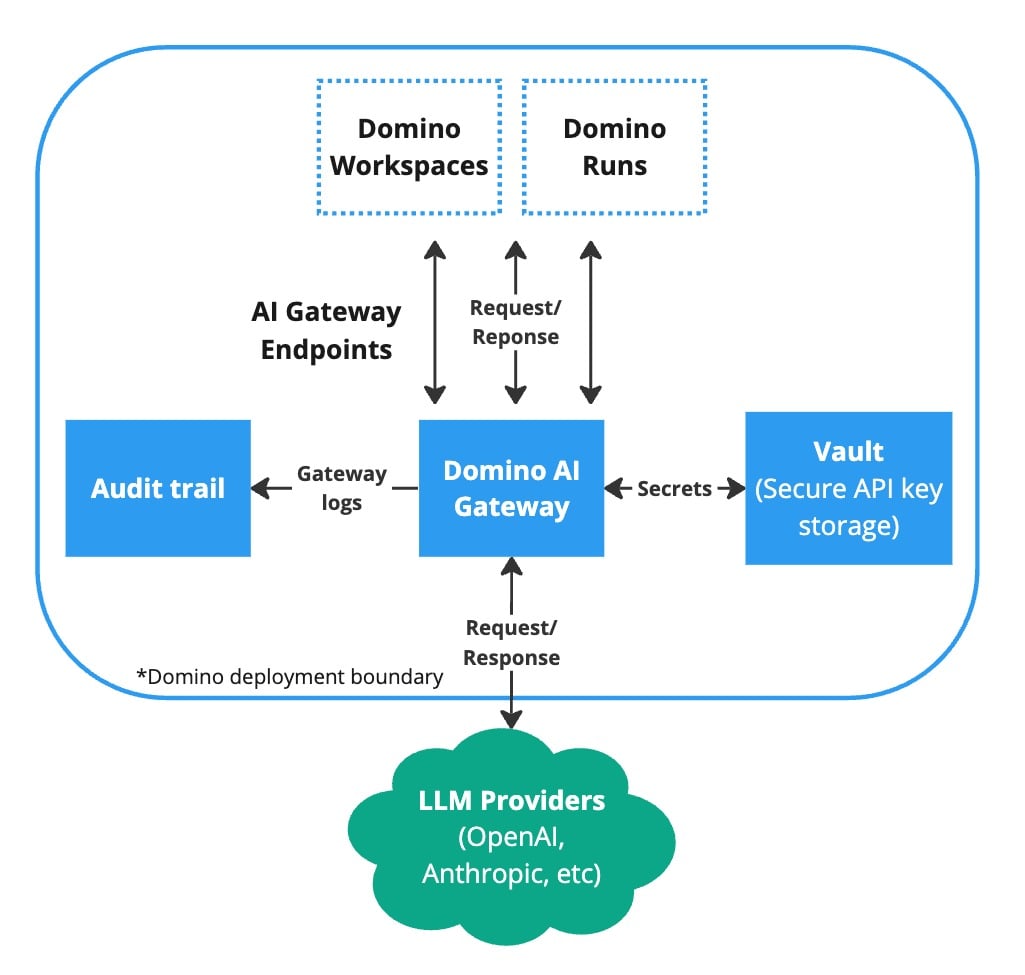 To create and manage AI Gateway endpoints in Domino, go to **Endpoints** > **Gateway LLMs** and configure the endpoint details and permissions. Alternatively, you can use the [Domino Platform API](/cloud/reference/api/domino-open-api). You can update or delete endpoints at any time.
See MLflow’s Deployment Server documentation for more information on the list of supported LLM providers and [provider-specific configuration parameters](https://mlflow.org/docs/latest/llms/deployments/index.html#provider-specific-configuration-parameters).
Once an endpoint is created, authorized users can query the endpoint in any Workspace or Run using the standard [MLflow Deployment Client API](https://mlflow.org/docs/latest/llms/deployments/index.html#client-api). For more information, see the documentation to [Use Gateway Domino endpoints](/cloud/platform-capabilities/features/genai/llm-gateway).
### Endpoint permission management
You can configure AI Gateway endpoints to be accessible to everyone or a specific set of users and/or organizations. These permissions can be configured in the second step of the creation modal and can be changed at any point after.
### Secure credential storage
When creating an endpoint, you will most likely need to pass a model-specific API key (such as OpenAI’s `openai_api_key`) or secret access key (such as AWS Bedrock’s `aws_secret_access_key`). When you create an endpoint, all of these keys are automatically stored securely in Domino’s central vault service and are never exposed to users when they interact with AI Gateway endpoints.
The secure credential store helps prevent API key leaks and provides a way to centrally manage API keys, rather than simply giving plain text keys to users.
## AI Gateway audit trail
Domino logs all AI Gateway endpoint activity to [Domino’s central audit system](/cloud/admin/operations/audit-logs). To see AI Gateway endpoint activity, go to **Endpoints** > **Gateway Domino endpoints** and click on the **Download logs** button. This will download a `txt` or `json` file with all the AI Gateway endpoint activity from the past six (6) months. You can further customize the fetched audit events by using the [Domino Platform API](/cloud/reference/api/domino-open-api).
## Next steps
Learn how to [create AI Gateway endpoints as a Domino admin](/cloud/admin/platform-configuration/ai-gateway).
To create and manage AI Gateway endpoints in Domino, go to **Endpoints** > **Gateway LLMs** and configure the endpoint details and permissions. Alternatively, you can use the [Domino Platform API](/cloud/reference/api/domino-open-api). You can update or delete endpoints at any time.
See MLflow’s Deployment Server documentation for more information on the list of supported LLM providers and [provider-specific configuration parameters](https://mlflow.org/docs/latest/llms/deployments/index.html#provider-specific-configuration-parameters).
Once an endpoint is created, authorized users can query the endpoint in any Workspace or Run using the standard [MLflow Deployment Client API](https://mlflow.org/docs/latest/llms/deployments/index.html#client-api). For more information, see the documentation to [Use Gateway Domino endpoints](/cloud/platform-capabilities/features/genai/llm-gateway).
### Endpoint permission management
You can configure AI Gateway endpoints to be accessible to everyone or a specific set of users and/or organizations. These permissions can be configured in the second step of the creation modal and can be changed at any point after.
### Secure credential storage
When creating an endpoint, you will most likely need to pass a model-specific API key (such as OpenAI’s `openai_api_key`) or secret access key (such as AWS Bedrock’s `aws_secret_access_key`). When you create an endpoint, all of these keys are automatically stored securely in Domino’s central vault service and are never exposed to users when they interact with AI Gateway endpoints.
The secure credential store helps prevent API key leaks and provides a way to centrally manage API keys, rather than simply giving plain text keys to users.
## AI Gateway audit trail
Domino logs all AI Gateway endpoint activity to [Domino’s central audit system](/cloud/admin/operations/audit-logs). To see AI Gateway endpoint activity, go to **Endpoints** > **Gateway Domino endpoints** and click on the **Download logs** button. This will download a `txt` or `json` file with all the AI Gateway endpoint activity from the past six (6) months. You can further customize the fetched audit events by using the [Domino Platform API](/cloud/reference/api/domino-open-api).
## Next steps
Learn how to [create AI Gateway endpoints as a Domino admin](/cloud/admin/platform-configuration/ai-gateway).