> ## Documentation Index
> Fetch the complete documentation index at: https://docs.domino.ai/llms.txt
> Use this file to discover all available pages before exploring further.
# Use the Workspace File Audit App
Deploy the app, then query and export file-level audit data by date range, user, project, or file path.
## Deploy the application
Set up the **Workspace File Audit App** to query and export audit data. The app is available from the Domino GitHub repository and requires the Domino Standard Environment (DSE).
Hardware requirements depend on query scope. For typical usage (up to one month of events), use at least 6 CPU cores and 8 GB memory. For larger time ranges, use more resources.
1. Go to **Projects** > **New Project**, then select **Import from Git** and enter the repository URL:
```markdown theme={null}
https://github.com/dominodatalab/Workspace-File-Audit-Application
```
2. Complete the project creation and open the project.
3. Go to **Deployments** > **Apps & Agents** > **Publish** > **App**.
4. Configure the deployment:
* **Name** and **Description** (example: "Workspace File Audit Query Tool").
* **App file**: `start.sh`
* **Environment**: Latest DSE
* **Hardware Tier**: Select based on your organization’s tier names and resource needs
5. Select **Enable deep linking and query parameters** then click **Publish**.
6. Wait for the app status to show **Running**, then select **Open**.
**Note**: If the DSE is not available in your deployment, contact your Domino administrator.
## Filter and view events
Filter audit events by date range, event type, user, project, or file path.
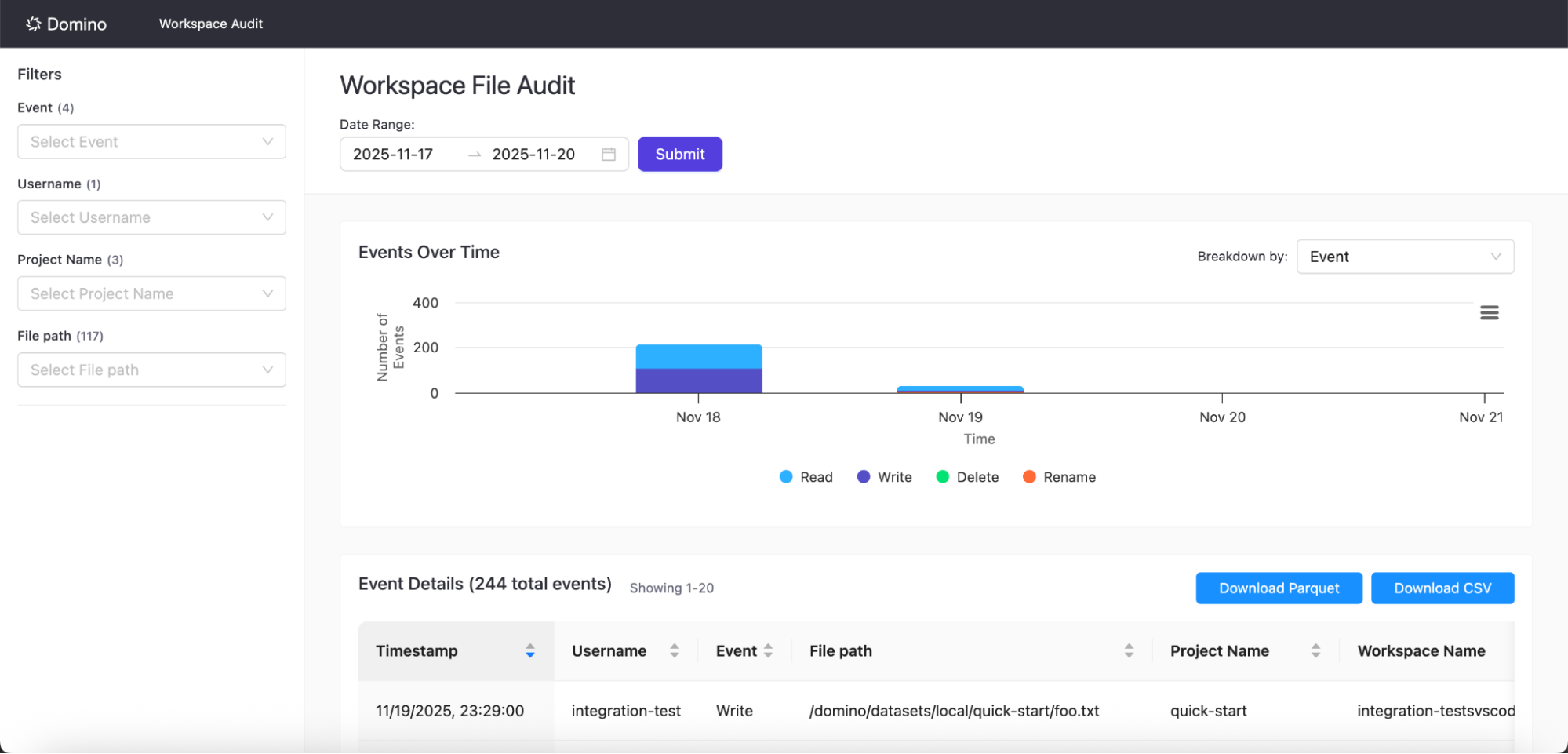 1. In the Workspace File Audit App, select a **Date Range** (recommended: 90 days or less; maximum: 1 year).
2. Select filters for **Event**, **Username**, **Project Name**, or **File path**.
3. Select **Submit**.
Results display in two views:
* **Events Over Time chart**: Total event counts across your timeframe
* **Events Details table**: Individual events with timestamp, user, event type, and file path
**Note**: New event data becomes available approximately every hour.
## Export events
Export system events from the UI or API for compliance reporting, security investigations, or long-term archival.
1. Filter events to the desired results.
2. Select **Download Parquet** or **Download CSV**.
3. Save the file locally.
The system automatically splits and packages CSV exports over 1 million records as a ZIP archive.
## Access events via API
Use the [Workspace File Audit Trail API](/cloud/reference/api/workspace-file-audit-trail-api): to programmatically access Workspace File Access events:
* Authenticate with standard Domino API credentials
* Filter by time range, user, event type, or resource
* Export data for external reporting or archival
## Access events in object storage
Domino stores processed events as Parquet files. Query them directly with cloud tools or analytics engines like DuckDB.
**Domino Cloud and DCLS**\
Domino stores audit events in Domino-hosted object storage within a single-tenant, fully managed environment. Domino manages storage infrastructure and access controls. Request credentials from Domino for authorized access.
## Customize the Workspace File Audit App
Clone the official repository to create a custom version for your organization. This lets you extend functionality, apply internal branding, or control rollout timing.
Customized apps will not be tested/validated for each new release; only our official Domino App is supported.
1. Clone the repository to your organization’s Git account.
2. Create a Git-based project in Domino pointing to your cloned repository.
3. Deploy your custom version.
## Next steps
* [Workspace File Access events](/cloud/platform-capabilities/features/governance/audit-trail/workspace-file-access-events): How Domino captures file-level operations in workspaces
* [Monitoring and alerting](/cloud/platform-capabilities/features/governance/audit-trail/workspace-file-access-events#monitoring-and-alerting): Set up Grafana alerts for audit pipeline failures
* [Workspace File Audit Trail API](/cloud/reference/api/workspace-file-audit-trail-api): Query and export workspace file access events
1. In the Workspace File Audit App, select a **Date Range** (recommended: 90 days or less; maximum: 1 year).
2. Select filters for **Event**, **Username**, **Project Name**, or **File path**.
3. Select **Submit**.
Results display in two views:
* **Events Over Time chart**: Total event counts across your timeframe
* **Events Details table**: Individual events with timestamp, user, event type, and file path
**Note**: New event data becomes available approximately every hour.
## Export events
Export system events from the UI or API for compliance reporting, security investigations, or long-term archival.
1. Filter events to the desired results.
2. Select **Download Parquet** or **Download CSV**.
3. Save the file locally.
The system automatically splits and packages CSV exports over 1 million records as a ZIP archive.
## Access events via API
Use the [Workspace File Audit Trail API](/cloud/reference/api/workspace-file-audit-trail-api): to programmatically access Workspace File Access events:
* Authenticate with standard Domino API credentials
* Filter by time range, user, event type, or resource
* Export data for external reporting or archival
## Access events in object storage
Domino stores processed events as Parquet files. Query them directly with cloud tools or analytics engines like DuckDB.
**Domino Cloud and DCLS**\
Domino stores audit events in Domino-hosted object storage within a single-tenant, fully managed environment. Domino manages storage infrastructure and access controls. Request credentials from Domino for authorized access.
## Customize the Workspace File Audit App
Clone the official repository to create a custom version for your organization. This lets you extend functionality, apply internal branding, or control rollout timing.
Customized apps will not be tested/validated for each new release; only our official Domino App is supported.
1. Clone the repository to your organization’s Git account.
2. Create a Git-based project in Domino pointing to your cloned repository.
3. Deploy your custom version.
## Next steps
* [Workspace File Access events](/cloud/platform-capabilities/features/governance/audit-trail/workspace-file-access-events): How Domino captures file-level operations in workspaces
* [Monitoring and alerting](/cloud/platform-capabilities/features/governance/audit-trail/workspace-file-access-events#monitoring-and-alerting): Set up Grafana alerts for audit pipeline failures
* [Workspace File Audit Trail API](/cloud/reference/api/workspace-file-audit-trail-api): Query and export workspace file access events