> ## Documentation Index
> Fetch the complete documentation index at: https://docs.domino.ai/llms.txt
> Use this file to discover all available pages before exploring further.
# Review and approve bundles
After evidence is collected and findings are documented, bundles are submitted for formal stakeholder review. Practitioners can submit bundles for review at any stage, and approvers are notified when their input is needed.
A single bundle can now include multiple policies, allowing related governance requirements to be reviewed together. Approval flows also support per-bundle customization, so different bundles can have distinct approvers, even under the same policy.
Each approval stage is defined by the Governance administrator and may vary by policy type. Approvers can approve, reject, or grant conditional approval pending resolution of findings or required changes.
## How approvals work
During a bundle review, approvers can document findings to capture and track issues that block compliance. [Add findings to a governed bundle](/cloud/platform-capabilities/features/governance/work-with-bundles/add-findings-to-bundle) has details on findings attributes and workflows.
These attributes help drive progress toward production readiness. If a bundle includes multiple policies, review stages for each policy are grouped in the same interface to streamline approvals across overlapping requirements. An example approval flow might look something like this:
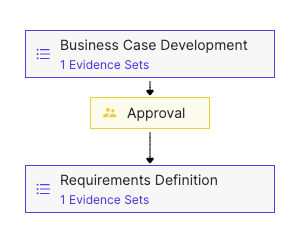 [Findings](/cloud/platform-capabilities/features/governance/work-with-bundles/add-findings-to-bundle) are tied to approval stages and can include supporting evidence.
Once all findings are resolved, the approver marks the stage as **Stages Complete** to finalize the review.
### How conditional approval works
A reviewer can approve a stage conditionally by attaching findings to the approval. These findings form a remediation plan.
If all findings are resolved by their due dates, the approval remains valid. If any findings are not resolved on time, the approval is automatically revoked.
Conditional approval allows practitioners to proceed to the next stage while outstanding findings are tracked and addressed.
## Submit a bundle for review (practioners)
After [creating a governed bundle](/cloud/platform-capabilities/features/governance/work-with-bundles) or editing an existing one, you can submit it for stakeholder review. This is typically done after completing requirements for each stage.
[Findings](/cloud/platform-capabilities/features/governance/work-with-bundles/add-findings-to-bundle) are tied to approval stages and can include supporting evidence.
Once all findings are resolved, the approver marks the stage as **Stages Complete** to finalize the review.
### How conditional approval works
A reviewer can approve a stage conditionally by attaching findings to the approval. These findings form a remediation plan.
If all findings are resolved by their due dates, the approval remains valid. If any findings are not resolved on time, the approval is automatically revoked.
Conditional approval allows practitioners to proceed to the next stage while outstanding findings are tracked and addressed.
## Submit a bundle for review (practioners)
After [creating a governed bundle](/cloud/platform-capabilities/features/governance/work-with-bundles) or editing an existing one, you can submit it for stakeholder review. This is typically done after completing requirements for each stage.
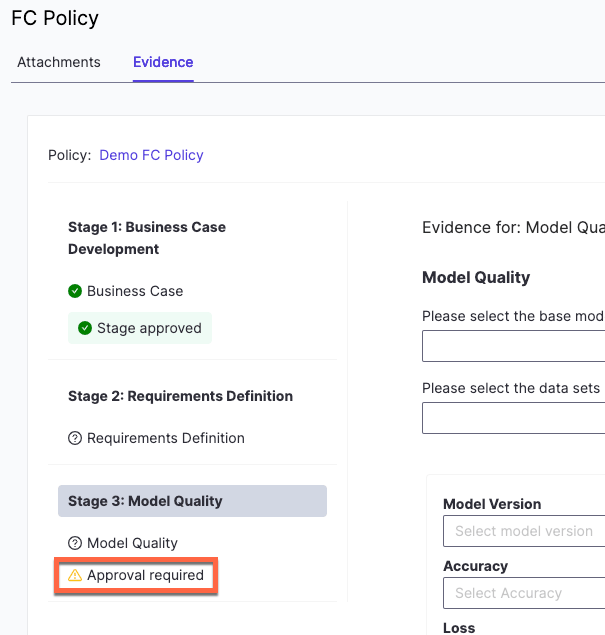 1. Go to **Project**, open the relevant project, and select **Govern** > **Bundles** from the sidebar.
2. Select the bundle that you want to send for review.
3. On **Stage 1**, fill in the required information and proceed through each stage.
4. When you reach a stage with **Approval required**, click **Start an evidence review**.
5. Complete all required fields and click **Request Review**.
6. To confirm your submission, go to the **Domino Welcome** page and verify that a review task was created.
## Review and respond to a bundle (approvers)
When a practitioner submits a bundle for review, you receive an email notification. Select **Review & Approve** in the email to open the Evidence notebook, which contains the approval questionnaire for the bundle.
1. Complete the approval questionnaire, if one exists.
2. Optionally, select **Add Comment** or **Add Finding** to document issues.
3. Select **Approve**. If there are open findings, a dialog displays them. Selecting a finding changes the button to **Conditionally approve**.
* To grant conditional approval, select the findings to attach as conditions, then select **Conditionally approve**.
* To grant full approval, select **Approve** without selecting any findings.
**Reject**: Decline approval and document the findings that must be addressed.
## Bundle Reset
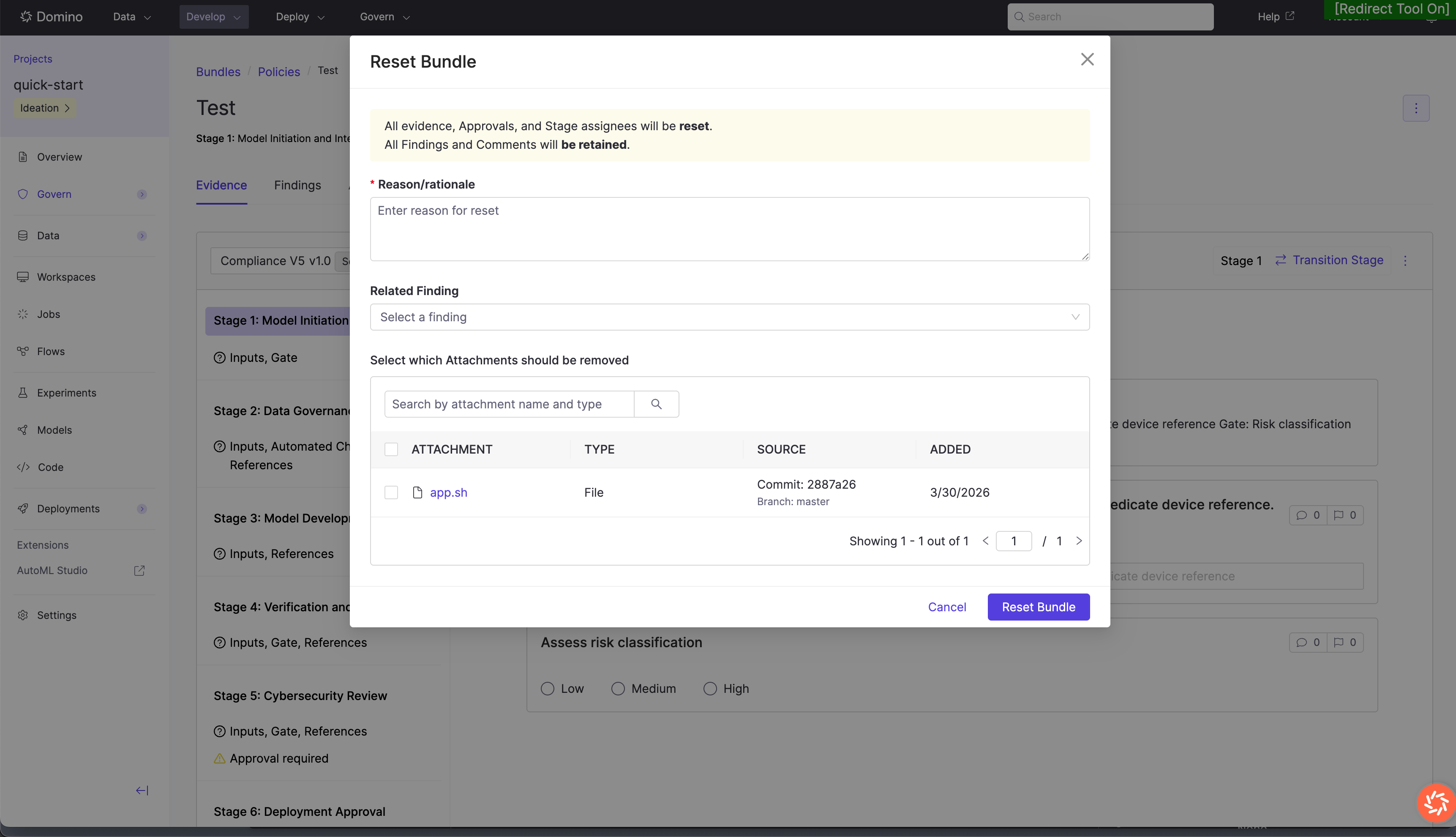
Reviewers can reject a bundle and reset it back to the first stage when a fundamental error is identified during review. This is distinct from withholding approval — a reset invalidates the current review cycle and requires work to restart from the beginning.
### Prerequisites
Bundle reset is only available for bundles whose policy has sequential stage ordering enabled. Bundles with non-sequential policies do not support this workflow.
### What happens on reset
* **Evidence:** All answers to evidence questions are cleared and must be re-entered.
* **Approvals:** All pending and approved approval requests are revoked. Stage assignees are also cleared and must be reassigned.
* **Findings:** All findings are preserved and remain visible in the Findings list and alongside their associated evidence.
* **Comments:** All comments are retained and remain visible, even on cleared evidence fields.
* **Attachments:** During the reset, reviewers can choose to remove one or more attachments. Any attachments not selected for removal are carried forward to the reset bundle.
### Audit trail
Every reset is captured as an immutable event in the bundle’s History tab, recording the rejecting reviewer, timestamp, reason, and the state of attachments at the time of reset. This lineage is available to auditors at any time.
1. Go to **Project**, open the relevant project, and select **Govern** > **Bundles** from the sidebar.
2. Select the bundle that you want to send for review.
3. On **Stage 1**, fill in the required information and proceed through each stage.
4. When you reach a stage with **Approval required**, click **Start an evidence review**.
5. Complete all required fields and click **Request Review**.
6. To confirm your submission, go to the **Domino Welcome** page and verify that a review task was created.
## Review and respond to a bundle (approvers)
When a practitioner submits a bundle for review, you receive an email notification. Select **Review & Approve** in the email to open the Evidence notebook, which contains the approval questionnaire for the bundle.
1. Complete the approval questionnaire, if one exists.
2. Optionally, select **Add Comment** or **Add Finding** to document issues.
3. Select **Approve**. If there are open findings, a dialog displays them. Selecting a finding changes the button to **Conditionally approve**.
* To grant conditional approval, select the findings to attach as conditions, then select **Conditionally approve**.
* To grant full approval, select **Approve** without selecting any findings.
**Reject**: Decline approval and document the findings that must be addressed.
## Bundle Reset
Reviewers can reject a bundle and reset it back to the first stage when a fundamental error is identified during review. This is distinct from withholding approval — a reset invalidates the current review cycle and requires work to restart from the beginning.
### Prerequisites
Bundle reset is only available for bundles whose policy has sequential stage ordering enabled. Bundles with non-sequential policies do not support this workflow.
### What happens on reset
* **Evidence:** All answers to evidence questions are cleared and must be re-entered.
* **Approvals:** All pending and approved approval requests are revoked. Stage assignees are also cleared and must be reassigned.
* **Findings:** All findings are preserved and remain visible in the Findings list and alongside their associated evidence.
* **Comments:** All comments are retained and remain visible, even on cleared evidence fields.
* **Attachments:** During the reset, reviewers can choose to remove one or more attachments. Any attachments not selected for removal are carried forward to the reset bundle.
### Audit trail
Every reset is captured as an immutable event in the bundle’s History tab, recording the rejecting reviewer, timestamp, reason, and the state of attachments at the time of reset. This lineage is available to auditors at any time.
 ## Next steps
* [Gates](/cloud/platform-capabilities/features/governance/gating-domino-governance): control governed actions based on approval status.
* [Add findings to a bundle](/cloud/platform-capabilities/features/governance/work-with-bundles/add-findings-to-bundle): document review decisions and track issues.
* [Work with bundles](/cloud/platform-capabilities/features/governance/work-with-bundles): package models and artifacts for review
## Next steps
* [Gates](/cloud/platform-capabilities/features/governance/gating-domino-governance): control governed actions based on approval status.
* [Add findings to a bundle](/cloud/platform-capabilities/features/governance/work-with-bundles/add-findings-to-bundle): document review decisions and track issues.
* [Work with bundles](/cloud/platform-capabilities/features/governance/work-with-bundles): package models and artifacts for review