> ## Documentation Index
> Fetch the complete documentation index at: https://docs.domino.ai/llms.txt
> Use this file to discover all available pages before exploring further.
# Get API key
To interact with secured endpoints of the [Model Monitoring API](/cloud/reference/api/model_monitoring/dmm-api) or [Domino Platform API](/cloud/reference/api/domino-open-api), you must send an API authentication token or key along with your request. This parameter identifies you as a specific Domino user so Domino can check for authorization.
## Find your Domino Rest API key
This feature will be deprecated in future versions of Domino. Domino recommends using [Service Accounts](/cloud/admin/identity-and-access/manage-users/service-accounts) as they provide stable, token-based authentication for API calls, independent access management, and stronger security.
To authenticate your requests, include your API key with the header `X-Domino-Api-Key`.
**Get your API key**
1. Go to **Account** > **Account Settings**.
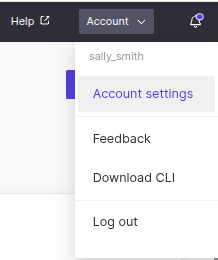 2. Click **API Key** in the left navigation to get your key.
 Anyone with this key can authenticate to the Domino application as the user it represents and take any actions that the user is authorized to perform. Treat it like a sensitive password.