

- Read
- Write
- Create
- Delete
- Rename
How Workspace file access auditing works
Domino monitors file system activity inside active Workspaces and records relevant events.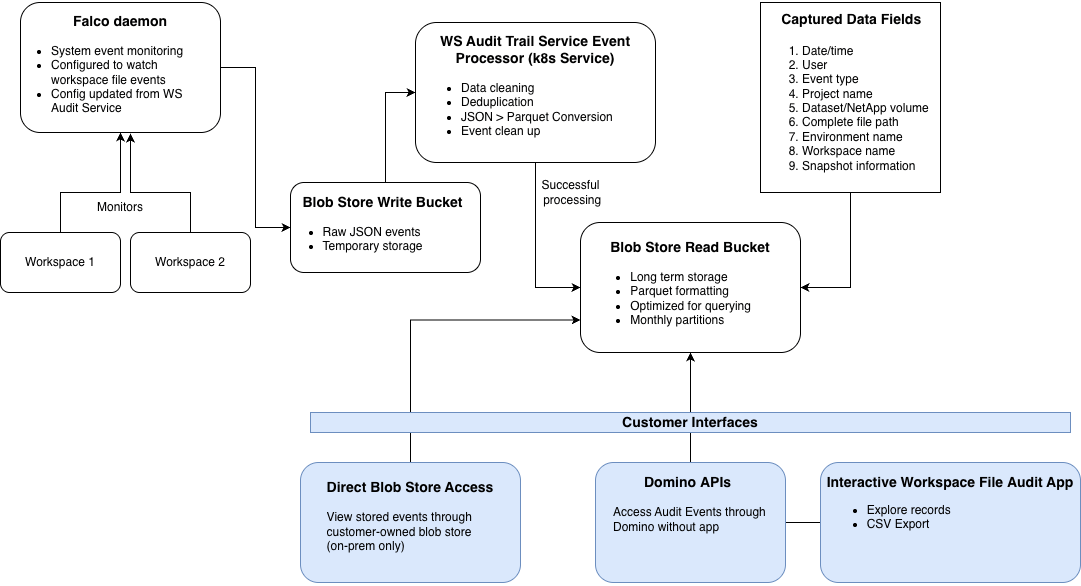
File system monitoring
A Falco daemon runs alongside each workspace pod and observes file system calls. Falco monitors at the kernel level, so it captures file access consistently. This works regardless of access method: code execution, terminals, notebooks, or IDE tooling.Deduplication
Domino deduplicates events to reduce noise and storage overhead. The system records repeated access to the same file by the same user as a single event. This deduplication uses a configurable time window. The process reduces event volumes while preserving meaningful access records. Advanced configuration has details on how to adjust deduplication settings.Event processing and storage
The system periodically processes staged events and writes them to object storage. The pipeline:- Cleans and deduplicates raw JSON events
- Converts JSON to Parquet format for optimized querying
- Archives events for long-term retention (up to 30 years)
Processing delay
Domino processes events asynchronously in scheduled batches, not in real time. The system captures and stages file system events continuously. It then processes and writes them to object storage during each run (default: every 60 minutes). Expect a delay between when a file access event occurs and when it appears in object storage, APIs, or the Workspace File Audit App. You can configure processing frequency withcom.cerebro.domino.workspaceFileAudit.eventProcessingInMinutes. The default is 60 minutes (minimum 60, maximum 360).
Query and access
You can access events through:- The Workspace Audit App
- The Audit Trail API
- Direct object storage queries
Storage and retention
Storage location and retention depend on your deployment type:Performance considerations
Enabling Workspace File Access events adds processing overhead to active workspaces. Based on Domino performance testing, enabling file access auditing typically adds:- ~ 15 percent CPU usage
- ~ 10 percent memory usage
Monitoring and alerting
Domino monitors the health of the Workspace Audit pipeline using built-in Grafana alert rules. Two components are critical for audit data integrity:- Falco: Captures file system events
- Workspace Audit service: Processes and stores events
- Falco pipeline overload: Falco or Falcosidekick can’t forward events fast enough and may begin dropping audit events.
- Workspace Audit service processing failures: The Workspace Audit service encounters repeated failures while processing captured file access events.
If a Grafana alert triggers
An alert means audit events may be delayed or dropped. To resolve:- Increase CPU or memory for affected workspaces or services
- Restart or recover the affected audit components
- Verify event flow returns to normal
Next steps
- Enable Workspace File Audits: Configure file-level access auditing
- Use the Workspace File Audit App: Deploy the app, then filter and export file-level audit events by date, user, Project, or path
- System events: View and export user and administrative actions