

requirements.txt in Python and install.R in R is a “dependency file” or “package manifest file”. These files are used to specify and manage the dependencies (that is, external libraries or packages) that a Python or R project requires to run successfully. They list the specific packages and their versions that need to be installed for the Project to work as intended.
Depending on the programming language and package management system, the file formats and naming conventions may vary, but the purpose is the same: to define and document the dependencies for a Project.
No special formatting is required for Domino compatibility of a dependency file. If it works outside of Domino, it works in Domino. There are a few specifics about the location of the file which are explained below.
When to use a package dependency file
Package dependency files can be used in a variety of scenarios. The following are a few examples.- Share code using Git-based source code management tools
- Make it easier for other developers to install the correct versions of the required libraries
- Install all the required dependencies in a single command
- Start each Domino Workspace or Job with specific versions, or the latest available versions, of Python, R, or Git repository packages
Python dependency file - requirements.txt
If it doesn’t already exist, create a file namedrequirements.txt in the root directory of your Project.
In a Git-based Project,
requirements.txt must be inside your Project’s Artifacts folder.requirements.txt is in place, Domino automatically installs the Python package every time you start a Workspace or Job within the Project.
Add Python packages
The requirements file specifies which libraries and any version requirements for them. For example:Generate a requirements.txt file from an existing Environment
If you’re using pip on your local machine, the easiest way to generate therequirements.txt file is to run the following command in the root of your Project folder (or in the Code folder if your Project is Git-based):
pip to install dependencies interactively. In a notebook cell, you can run:
Install packages hosted from a Git repository
Pip can install Python packages from source by cloning a public Git repository over HTTPs. See pip install for reference. To specify this, you must add something like the following line to yourrequirements.txt file:
R dependency file - install.R
If it doesn’t already exist, create a file named install.R in the root directory of your Project. Add the following line to install.R:
ggplot2 from a Git repository, your install.R should look like:
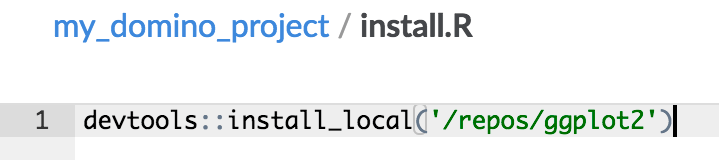
install.R is in place, enter a line at the beginning of your work within the Project to install the Project for your sessions.