

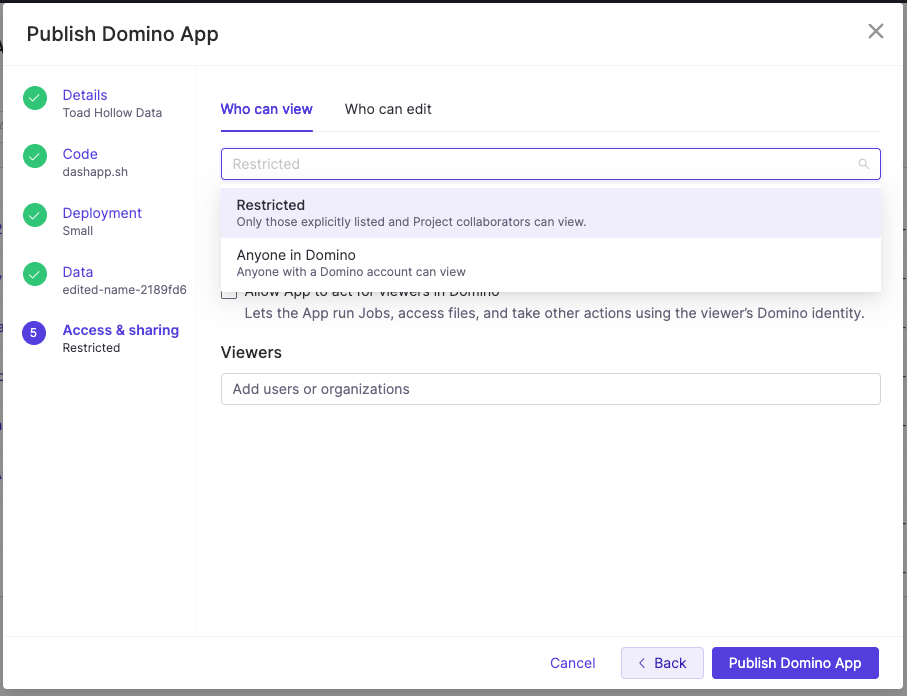
Choose a sharing mode
Project collaborators can also edit the App, so you add an editor by adding that person as a collaborator on the project that holds the App.
Handle access requests
The Share App dialog is where you review pending requests, grant or deny access, and track notifications.- Pending requests appear with Accept and Deny options.
- Access request notifications go out by email and in Domino when someone requests access, naming the requester, the App, the project, and linking to the Share App dialog.
- Access granted notifications go out by email and in Domino when you grant access, naming the App and linking to its details page.
Decide whose identity the App uses
By default an App acts with the identity and privileges of its publisher, so every viewer shares the publisher’s permissions when the App reaches Domino resources. Enable Allow App to act for viewers in Domino when the App has to query Datasets under row-level security, start Jobs for a viewer, use Data Sources that need viewer credentials, or take any other action as the viewer. The change takes effect after you restart the App. Only SysAdmins or CloudAdmins can enable this setting.Related
- App security and identity: Identity propagation levels, consent, and what an App can do as a viewer.
- Publish and deploy App versions: Create a version and start it before you share it.
- Allow external resources in Apps: Apps can be blocked from loading content unless the URLs are allowlisted.