

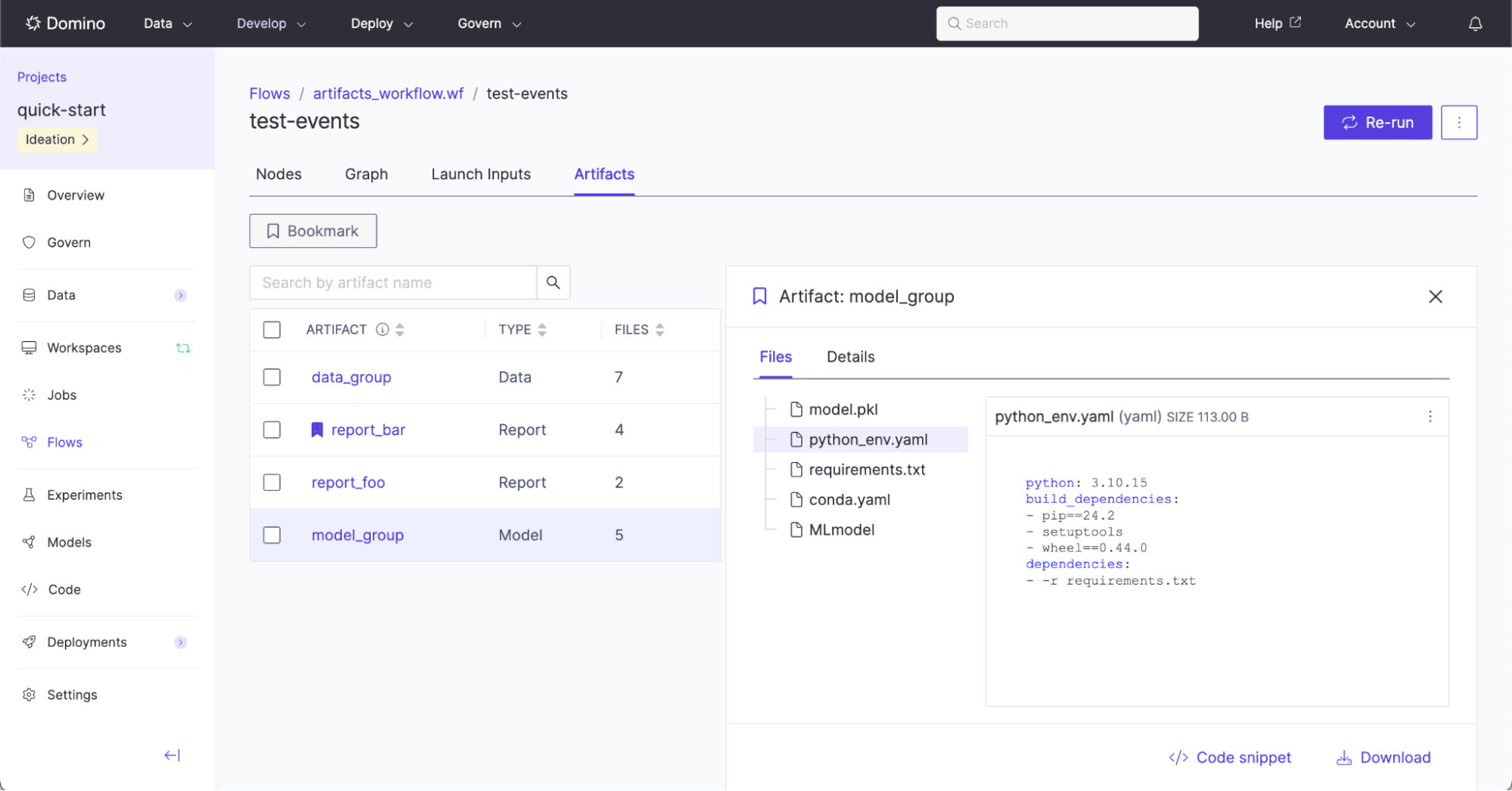
Artifact method is used to generate a named artifact. The named artifact can have individual files added to it anywhere in the workflow definition. Typically an Artifact is declared at the beginning of a workflow like this:
.File(name="file.ext") method can be called to declare that the output is an Artifact. For example:
-
DATAartifact: Files that may be added later as a new dataset snapshot. -
MODELartifact: Files that may later be registered as a model. -
REPORTartifact: Files that may be part of a collection that make up a report.
DataArtifact.File(name="data.csv") adds a FlyteFile output from the data_prep_job to the Flow Artifact declared as Artifact(name="My Data", type=DATA). Unlike the use of FlyteFile[TypeVar("csv")] from previous examples, Flow Artifact files automatically infer their type from the given file extension.
DataArtifact.File(name="data.csv") is used more than once:
Programmatically exporting to Domino Datasets and NetApp Volumes
Flow Artifacts can be programmatically exported to Domino Datasets and NetApp Volumes. This is useful for enabling continuous, automated movement of new output data into Datasets and NetApp Volumes.run_launch_export_artifacts_task inside a workflow, Domino generates a separate export execution that runs independently of the main workflow run. In the Graph view, the export launch node may appear near the start of the graph (for example, at n0) and can execute before downstream tasks have completed. This is expected behavior. The launch task only triggers the export process, and the actual export execution waits for the main workflow to finish and for all referenced Flow Artifacts to be fully generated.This design means that the visual placement of the launch node in the Graph view does not reflect the true ordering of when Flow Artifacts are exported. To verify export progress, open the separate export execution linked in the launch task’s logs. That execution contains detailed logs for each exported Flow Artifact.DataArtifact.File(name="data.csv") is programmatically exported to the Domino Dataset with ID 681d3030ae3a706ef9c7f08b, and the NetApp Volume with ID 5d1204c2-24c8-47df-a47f-69185efa602b using the helper method run_launch_export_artifacts_task.
run_launch_export_artifacts_task performs the programmatic export.
It is required to specify this task to use the Domino Standard Environment (DSE) from 6.0 onwards, or a custom environment that is built on top of the DSE >= 6.0, as these contain the required Flyte Python and jq dependencies.
The full list of available parameters to the method run_launch_export_artifacts_task include:
| Parameter | Type | Description and Example |
|---|---|---|
spec_list | List[Union[ExportArtifactToDatasetsSpec, ExportArtifactToNetAppVolumesSpec]] | The list of specifications used to determine the Flows artifacts to be exported to the Domino Datasets and NetApp Volumes. See the |
use_project_defaults_for_omitted | bool | If set to |
environment_name | Optional[str] | Name of the Environment to use in the Domino Job. |
environment_id | Optional[str] | ID of the Environment to use in the Domino Job. This is recommended over using |
environment_revision_id | Optional[str] | A specific revisionId of the environment to use. |
hardware_tier_name | Optional[str] | Name of the hardware tier to use in the Domino Job. It is recommended to use a minimal-resource hardware tier. |
hardware_tier_id | Optional[str] | ID of the hardware tier to use in the Domino Job. This is recommended over using |
retries | int | Number of times to retry this task during a workflow execution. |
timeout | Union[timedelta, int] = timedelta(hours=3) | The maximum amount of time for which one execution of this task should be executed. The execution is terminated if the runtime exceeds the given timeout. It is recommended to set this timeout duration to be greater than the workflow duration. |
spec_list example:
spec_list is either an ExportArtifactToDatasetsSpec or an ExportArtifactToNetAppVolumesSpec.
ExportArtifactToDatasetsSpec parameters:
| Parameter | Type | Description and Example |
|---|---|---|
artifact | Artifact | The Flow Artifact to export. |
dataset_id | str | ID of the Domino Dataset to export the artifact to. |
ExportArtifactToNetAppVolumesSpec parameters:
| Parameter | Type | Description and Example |
|---|---|---|
artifact | Artifact | The Flow Artifact to export. |
netapp_volume_id | str | ID of the NetApp Volume to export the artifact to. |
target_relative_path | str | Path on the NetApp Volume to export the artifact to. Defaults to an empty string, which writes to the volume root. |
file_collision_setting | FileCollisionSetting | How to resolve a naming conflict when a file with the same name already exists at the target path. Must be one of |
Additional examples
-
Data artifact with a single file:
Example scenario: A flow produces a single ADaM dataset with the file name
adae.sas7bdatand the user wants to track the single file under its own data entity calledadae.Expand for example code.
-
Data artifact with multiple files:
Example scenario: A flow produces multiple ADaM datasets (
adae.sas7bdat,advs.sas7bdat, andadsl.sas7bdat) and the user wants to track the collection of files under a single data entity calledadam.Expand for example code.
-
Model artifact with a single file:
Example scenario: A flow produces a single model file with the name
model.pkland the user wants to track the single file as its own model entity.Expand for example code.
-
Model artifact with multiple files:
Example scenario: A flow produces multiple files relating to a model (
model.pkl,classes.txt) and the user wants to track the collection of files as a single model entity.Expand for example code.
-
Report artifact with a single file:
Example scenario: A flow produces a single TFL report with the file name
t_vscat.pdfand the user wants to track the single file as its own report entity.Expand for example code.
-
Report artifact with multiple files:
Example scenario: A flow produces multiple TFL reports (
t_vscat.pdf,t_ae_rel.pdf) at different steps in the workflow and the user wants to track the collection of files as a single report entity.Expand for example code.