

Authenticate with a Personal Access Token
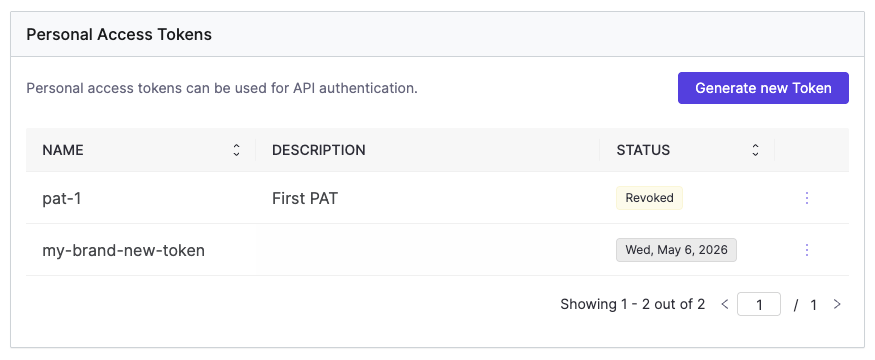
Personal Access Tokens (PATs) are user-managed credentials that let you authenticate against the Domino API. You create each token with a name, an optional description, and a custom expiration time. Once a token expires or is revoked, it can no longer be used. PATs give you full control over your API credentials: you can create as many as you need, each with its own expiration, and revoke or delete them individually or all at once. You can manage your PATs through the Account > Account settings > Personal Access Token panel in the Domino UI, or via the Domino API.Create a Personal Access Token
Using the UI
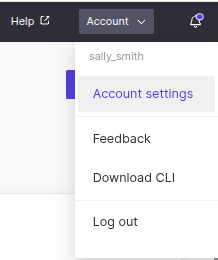
- Go to Account > Account settings > Personal Access Token.
-
Click Generate new Token.
-
Fill in the token details:
- Token name: A unique name for this token. May be visible to resource owners. Only alphanumeric characters, hyphens, and dots are allowed.
- Description: Optional. Describe what this token is used for.
-
Token Expiration: Select how long the token should be valid from the dropdown.
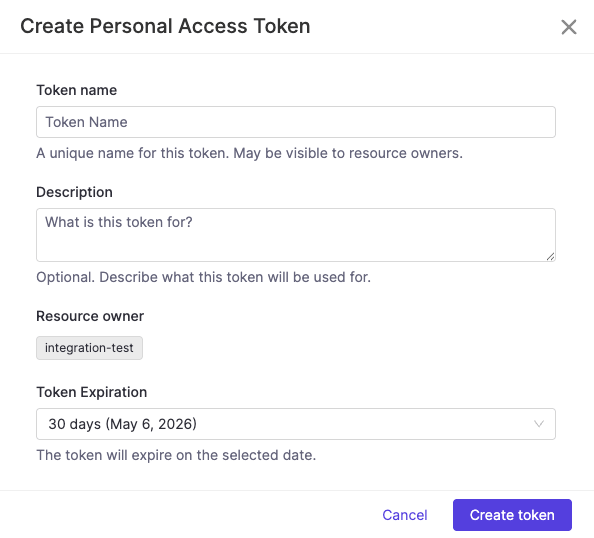
- Click Create token.
Using the API
Token names must be unique, use only alphanumeric characters, hyphens, and dots, and are automatically lowercased. TheexpiresIn field is expressed in seconds.
Use a Personal Access Token
Once created, use the PAT as a bearer token in theAuthorization header of any Domino API request:
Manage your Personal Access Tokens
The PAT panel lists all your tokens with their name, description, last used date, and current status. The STATUS column shows either a status badge (Revoked, Expired) or the token’s expiration date for active tokens.If your roles are modified by an administrator, your existing PATs are automatically revoked. You must create tokens to reflect the updated permissions.
Administrators can view and revoke PATs across all users in the platform. See Manage Personal Access Tokens for details.
Authenticate with a Domino service account token
Domino provides a convenient way for external software and automation pipelines to access Domino APIs via Domino Service Accounts. These accounts are managed by the Domino Administrators and have long-lasting credentials, making them easy to use in other parts of the enterprise outside of Domino. See Domino Service Accounts documentation for more information. Once you receive your token from an admin, you can use the token to authenticate and run Domino API calls. The following example starts a Domino Job using theSA_TOKEN. As an additional security measure, you should store the SA token as a custom environment variable for secure credential storage.
Choosing between a Personal Access Token and a Domino service account
Both PATs and Domino Service Account tokens authenticate against the Domino API, but they serve different purposes. Use a Personal Access Token when you are acting as yourself: running your own scripts, triggering jobs interactively, or accessing the API from your local machine. A PAT carries your identity and your permissions. It is the right choice for work that is tied to you as a user. Use a Domino Service Account when the action should not be tied to a specific person, for example, a CI/CD pipeline, a scheduled automation, or a system integration. Service Accounts have a stable identity independent of any individual user, which means they are not affected by changes to a person’s account or roles, and they can be managed and audited by administrators separately. As a rule of thumb: if you would be the one running it manually, use a PAT. If a system or pipeline would run it on its own, use a Service Account.Configure a service to trust Domino’s JWT
Each system has different steps for configuration but likely requires that you enter Domino’s JWKS endpoint which is<Domino URL>/auth/realms/DominoRealm/protocol/openid-connect/certs>. For offline services, retrieve and record the JWKS data to use offline with your library. Alternatively, you can use the public key or certificate which can be found at <Domino URL>/auth/realms/DominoRealm.
See JSON Web Key Sets to learn more about JWKS.
Token claims
By default, the Domino Token contains standard claims like name, username, and email, but you add mappers in thedomino-play client in Keycloak to include additional custom claims. This can be useful if you intend to set up bounded claims in the system to which you are integrating. For example, you might want to only authorize users with a specific organization claim or any other SAML assertion that flows into Domino from your Identity Provider.
Use the API proxy for Domino API authentication
You can use the API proxy to authenticate calls to Domino APIs using the address and port exposed by the proxy process. If you make a call to Domino and use this proxy, the proxy automatically adds the authentication information (the access JWT token) to the proxied request. See JWT.io for information about decoding and inspecting the content of a JWT token. Authentication with the API proxy-
The run starts immediately and the token is acquired when the first call is made through the proxy:
-
The API proxy runs and
$DOMINO_API_PROXYcontains the proxy address.
EnableLegacyJwtTooling feature flag is available. It is set to false by default, but can be set to true to enable legacy JWT propagation behavior (while also retaining the proxy behavior).
It is recommended to migrate workflows to use the JWT proxy for API access instead, as the JWT proxy is more reliable and the legacy behavior is scheduled for deprecation and removal in future Domino versions.
See Use a Token for Authentication for more information about JWT propagation.
Authenticate with an API key [LEGACY]
To interact with secured endpoints of the Model Monitoring API or Domino Platform API, you must send an API authentication token or key along with your request. This parameter identifies you as a specific Domino user so Domino can check for authorization. To authenticate your requests, include your API key with the headerX-Domino-Api-Key.
Get your API key
-
Go to Account > Account settings.
-
Click API Key, then click Regenerate to produce a key. You can only
view it once.
