

/mnt in the local file system. In a Git-backed Project, Domino tracks files in your artifacts directory, which show up at /mnt/artifacts inside a running Workspace or executing Job.
Keeping file-based data in these folders gives you the benefit of automatic reproducibility. However, due to how Domino synchronizes these files. Domino isn’t designed for high performance if your files are more than ~10 GB in total size or more than ~100,000 individual files.
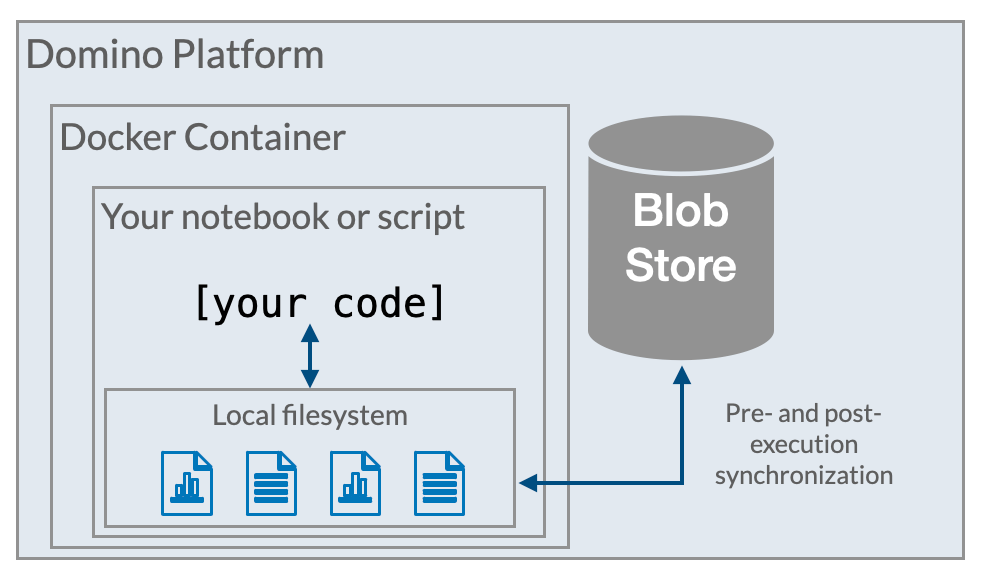
Domino stores the contents of Project files in the Domino Blob Store. The backing storage mechanism for the Blob Store varies based on the deployment infrastructure in which Domino is running:
When you first start a task in Domino that spins up a new compute resource to run your code, Domino hydrates the local file system on that compute resource, with your Project files. This happens, when:
- You start a Workspace (but not when you resume a paused Workspace)
- When you run a Job
- When a Domino endpoint or App starts (or restarts)
Next steps
These topics in this section explain how you can make your workflows reproducible in Domino. Reproducibility use casesLearn how to reproduce the results of a Job, Workspace, Model, App, or Launcher. Selectively revert past materials
Selectively restore a part of a Project, such as the package library version, while keeping your latest code and data. Remove a file from the DRE: Permanent deletion
Purge a file completely and permanently from the blob store. Track external data
Materialize external data as a file in Domino to benefit from the automatic tracking that Domino provides. Tips for reproducibility in Domino
Tips for maximizing the power of the Domino Reproducibility Engine.