

- simple_domino_agent: Minimal agent with tool calls, tracing, evaluation, and deployment.
- rag-agent-demo: RAG agent with ChromaDB, same Domino instrumentation patterns.
- simple_agent_api_only: REST API + A2A (agent-to-agent) example with bonus instructions on how to pair with a Domino-hosted agent registry and orchestrator.
How it works in Domino
A trace is a structured record of every LLM call, tool invocation, and decision your agent makes. It captures token usage, latency, and cost. One decorator (@add_tracing) instruments your code. The same trace data flows through every phase:
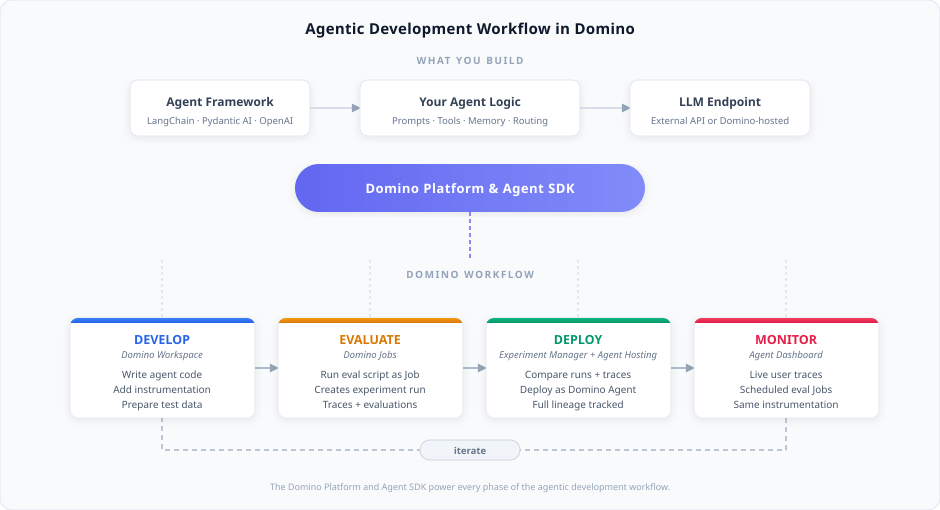
- Set up LLM access. Connect to an external LLM provider (OpenAI, Anthropic, Bedrock, or Azure OpenAI) or a Domino-hosted Model Endpoint. Store credentials as Domino environment variables.
-
Develop in a Domino Workspace. Write your agent code using any framework and add
@add_tracingwith inline evaluators to instrument it. Then prepare test data for your agent configuration. - Evaluate by running your evaluation script as a Domino Job. Each Job creates an agent version in the Experiment Manager. The run captures traces with evaluation scores for your agent configuration. Runs aggregate evaluation results across all traces.
- Compare and deploy in the Experiment Manager. Compare runs (different agent versions or configurations) and individual traces within runs. Deploy directly from any agent version that originated from a Job. Domino tracks full lineage between development and production, including commit, agent configuration, and performance results.
-
Monitor in the Agent Dashboard. The same
@add_tracinginstrumentation captures live user interactions as traces. Schedule evaluation Jobs to continuously score production traces and iterate when quality drops.
- Set up LLM access has details for both approaches.
- The Agentic AI overview has conceptual background on what makes a system agentic.