

- Click Account > Account Settings to open the Account Settings page.
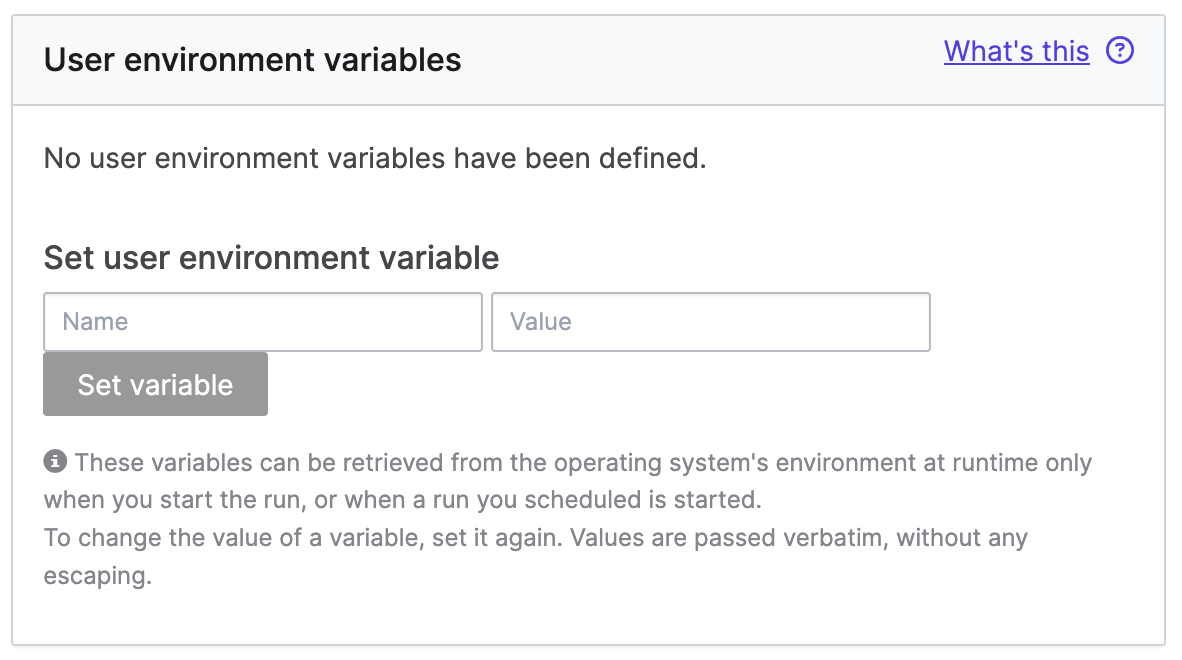
- Choose User environment variables from the list.
-
In the Environment variables section, add the following:
-
Name: Enter the variable name. For example,
YOUR_NAME_ENV_KEY. - Value: Enter a value for the variable. The maximum length for a value is 64K.
-
Name: Enter the variable name. For example,
- Click Set Variable.
Set user environment variables through the API
You can also set and unset user environment variables with the Domino public API, for example to set up variables from a script. The endpoints take your Domino user ID, not your identity provider ID. To find your user ID, callGET /api/users/v1/self and read the user.id field of the response.
Inside a Domino Workspace or Job, send requests through $DOMINO_API_PROXY, which authenticates them for you. From outside Domino, see Domino API authentication.
To set a variable, send its name as key and its value as value:
DELETE request with the variable name in the path. Domino returns 200 even when the variable isn’t set.
/accounts/idpid/{idpid}/environmentvariables endpoints, which take an identity provider ID. Use the endpoints in this section instead.
Access environment variables
Every language reads environment variables uniquely.- In Python, it might look like this:
- In R, it might look like this:
Next steps
- Our Best Practices guide you in setting up and maintaining your Domino environments.
- Set up user environment variables for each user. The system injects these variables at execution time for any run initiated by that user.
- Learn to build project variables to add, modify, or delete environment variables for your projects.
- Default environment variables lists the variables Domino sets in each Workspace, Job, App, and Domino endpoint.