

- Project creation, cloning, archiving, and configuration
- Dataset creation, updates, snapshots, and platform access
- Repository file operations via the UI
- User and role management
- Application, job, workflow, and model lifecycle activity
- Governance workflows, approvals, and findings
- NetApp-backed volume and external data source management
- Configuration record changes
Filter and view system events
The Audit Trail table displays event name, timestamp, user, and target resource.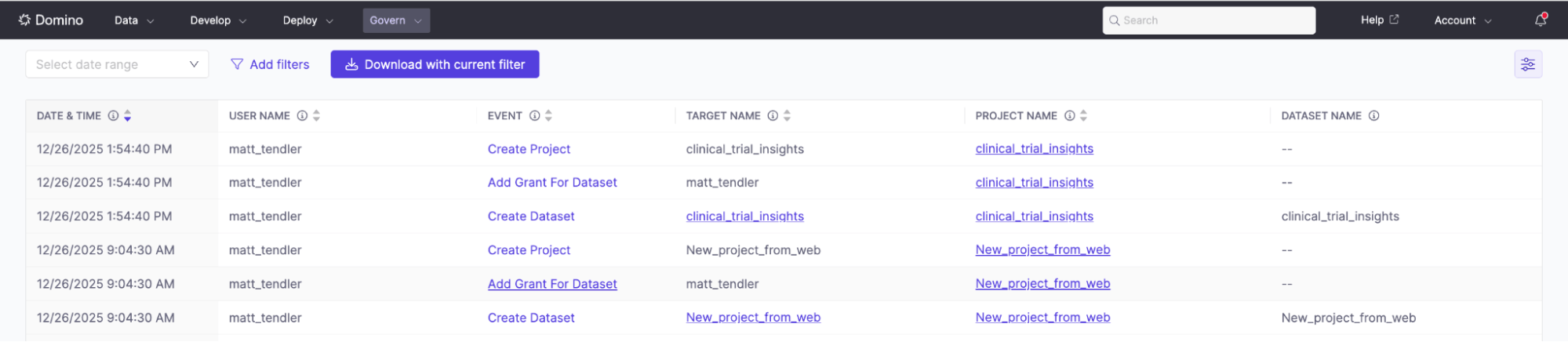
- Go to Admin > Audit Trail to open the event table.
- Select Add filters, choose an attribute, select an operator, and enter one or more values.
- Add more filters as needed.
- Select any event row to view full details.
Export system events
Export filtered audit data for reporting or archival.From the UI
- Filter events to the desired results.
- Select Download with current filter.
- Save the file locally.
From the API
Use the Audit Trail API to programmatically access system events.- Authenticate with standard Domino API credentials
- Filter by time range, user, event type, or resource
- Export data for external reporting or archival
Next steps
- Use the Domino Audit Trail: Overview of Domino’s unified audit capabilities
- Workspace File Access events: How Domino captures file-level operations in workspaces
- Audit Trail API: Programmatically query and export audit events
- Workspace File Audit Trail API: Query and export workspace file access events