

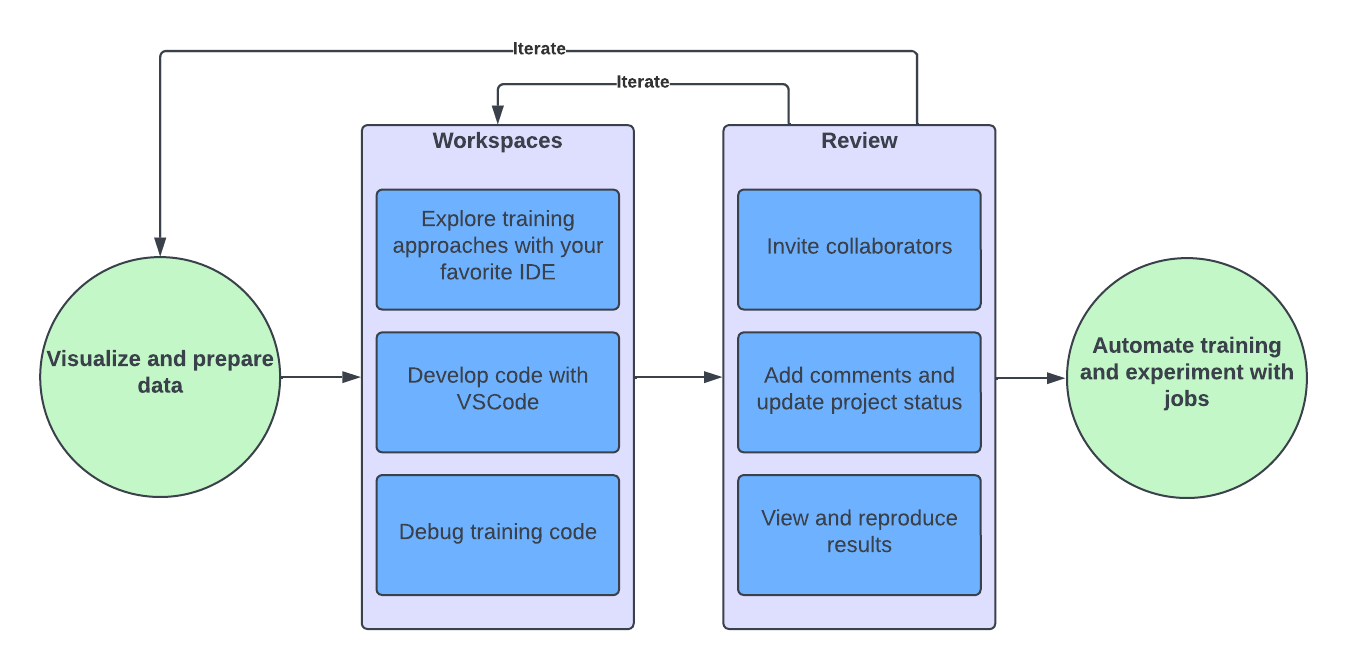
- Import, visualize, and prepare data.
- Explore model training approaches.
- Review and evaluate results with collaborators.
- Formalize your model through deployment, automation, or training on larger datasets.
Launch a Workspace
Workspaces are interactive code environments used to write and iterate on code directly in your browser. By default, Domino provides Jupyter Notebooks, JupyterLab, RStudio, and VSCode workspaces. However, you can configure workspaces to use custom IDEs too. When you launch a workspace, the configuration wizard guides you through the setup process. Select the following settings for your workspace:-
Compute environment - Standard compute environments ensure consistency for repeatable results. To get started, use the Domino Standard Environment. Eventually, you may want to customize your environment to use additional libraries.
Your environment can be a single machine or a cluster of machines for distributed computing.
- Hardware tier - Specify the CPU, memory, and GPU for the pods that host Domino. Your Domino administrator defines hardware tiers for you.
- IDE - By default, Domino comes with popular IDEs like Jupyter Notebooks, JupyterLab, VS Code, and RStudio. However, you can configure workspaces to use custom IDEs too.
Develop your model or solution
After you launch a Workspace, write the code to develop your solution. Each Project is different, and one of Domino’s greatest strengths is its flexibility to accommodate the tools that you want to use while also providing platform tools like data source connectors and Dataset management to save you time and ensure consistency.Schedule a training Job
While you develop your model in an interactive workspace, you can train it on a small dataset. To train it on a larger dataset, schedule a training job. Training jobs run outside of your development workspace, on a single machine or a distributed computing cluster, depending on the size of your data and the complexity of your model. Jobs are also useful for re-training your model on a regular basis to ensure ongoing accuracy. For example, you can schedule a daily job that trains your model on the latest data from the previous 24 hours. See Schedule jobs for the steps to schedule a one-time or recurring job.Manage experiments and collaborate
Use built-in MLflow tracking to track experiment runs. Use Domino’s collaboration tools to evaluate results and approve models for production.Best practices for model reproducibility
Versioning is the key to reproducibility. Follow these best practices to save time and ensure consistency across similar projects and jobs:- Create custom environments to manage dependencies, instead of installing dependencies at the command line.
- Before modifying a dataset, create a snapshot so that you can always point to a previous version of the data. See Create a snapshot of a dataset for instructions.
- Commit your code to Git before running any executions (even in your workspace), so that each execution is associated with a specific commit.
- For complex analysis or operations on big data, use jobs instead of workspaces.