Autoscaling issues
When node pools have used all compute nodes specific with node pool’s max-nodes, Workspaces, Jobs, Apps, and Domino endpoints may not start at all. The following is an example error from a user’s logs: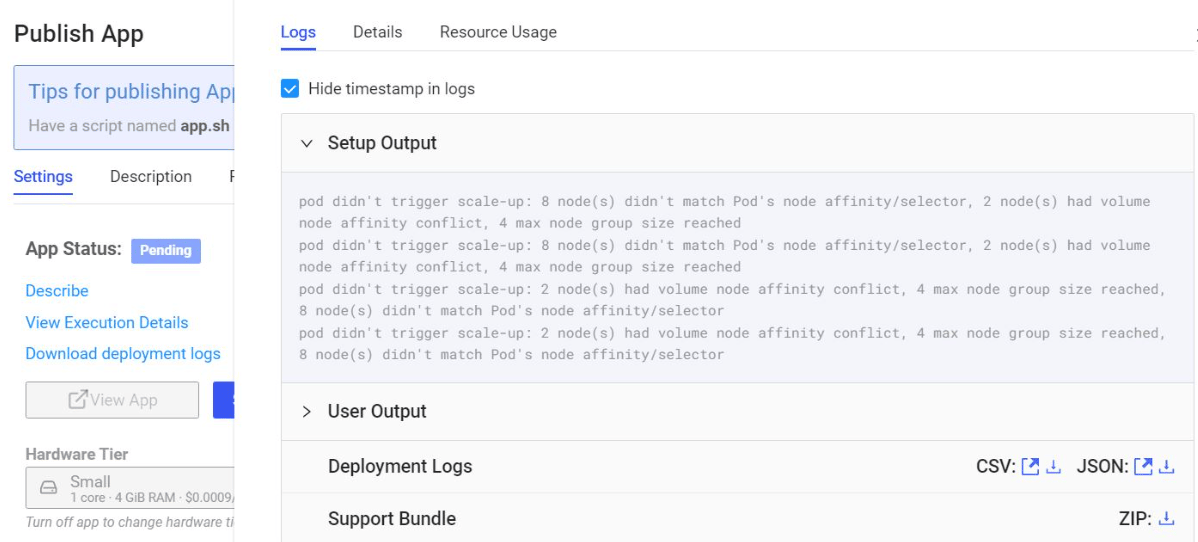
small-k8s hardware tier is mapped to the node pool with the nodeSelector: dominodatalab.com/node-pool: default. The message 8 node(s) didn’t match Pod’s node affinity/selector means there are 8 nodes with room in terms of CPU/RAM, but they have different labels/selectors (for example, they might be in a different node-pool than the one specified in the hardware tier chosen).
The message 2 node(s) had volume node affinity conflict means the Autoscaling groups need to be set to one AZ per group. If they are not, this volume node affinity conflict appears because the node (EC2 instance for example) and volume are in different availability zones.
The message “4 max node group size reached” means the scale-up cannot occur in four suitable (label-wise) node groups because they’re maxed out. Therefore the AWS ASG max-node size should be increased in this case.
Misc Workspaces and Jobs issues
Inspecting the Workspace and Job pod status from Kubernetes combined with Kubernetes events usually gives a good starting point for troubleshooting.Use the web UI for troubleshooting
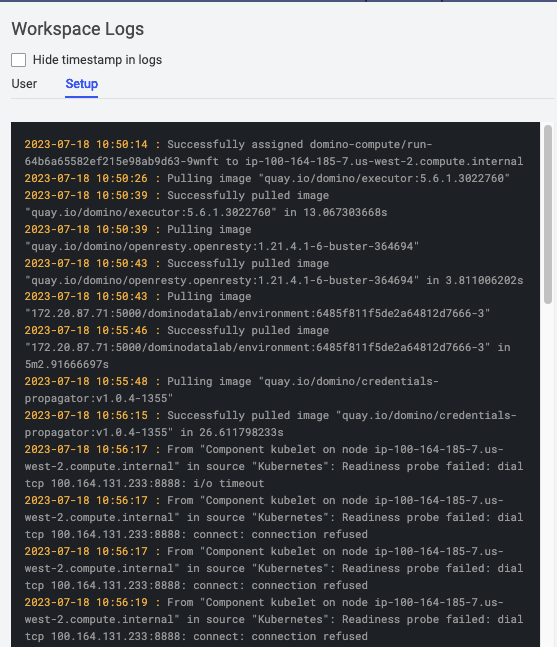
Most of the troubleshooting requires Kubernetes and AWS dashboard access. However, there are cases where users or administrators might be able to gather information using the Domino UI. Workspace logs are an example of logs accessible to the users. There are two types of workspace logs:- Setup logs: Messages related to setting up the underlying compute infrastructure and pulling the compute environment images into Workspace Kubernetes pods.
-
User logs: Messages related to pre-run scripts, package install with a
requirements.txtfile, and other messages during the Workspace execution.