

renv.lock, which is especially useful in GxP-regulated workflows where reproducibility matters. Configure one or more servers from the Admin panel, providing each server’s connection details and, optionally, restricting which repositories users can search.
Prerequisites
- Confirm that
com.cerebro.domino.workbench.workspace.enablePpmUIistruein configuration records. This enables the integration and is the default in Domino 6.3. - A network-accessible PPM server.
- A configured API key for the PPM server.
- A Compute Environment with an
update.Rscript at/home/ubuntuthat includes themanage_renv_environment()function. That script handles package installation,renvupdates and snapshots, and any logic needed to meet GxP compliance requirements.
Configure a PPM server
1
Open the integrations settings
In the Admin panel, go to Platform settings > Integrations.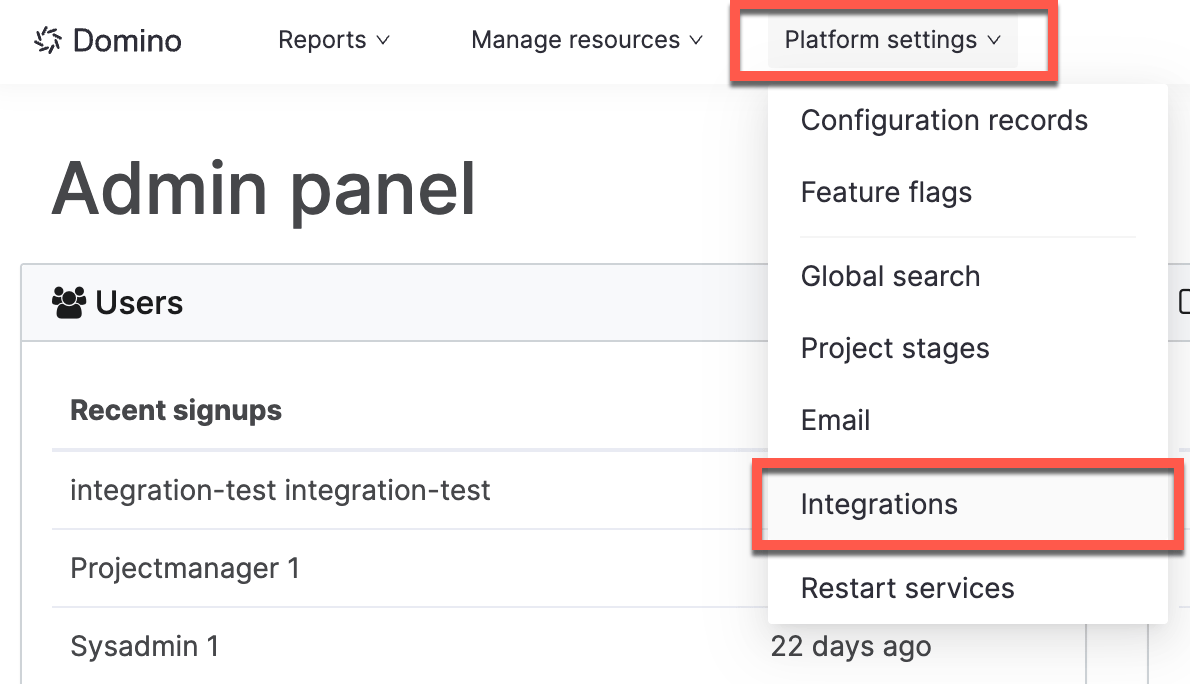
2
Add the server
Under Posit Package Manager, click Add PPM Server in the top right, then fill in Name, Base Server URL, and API Key.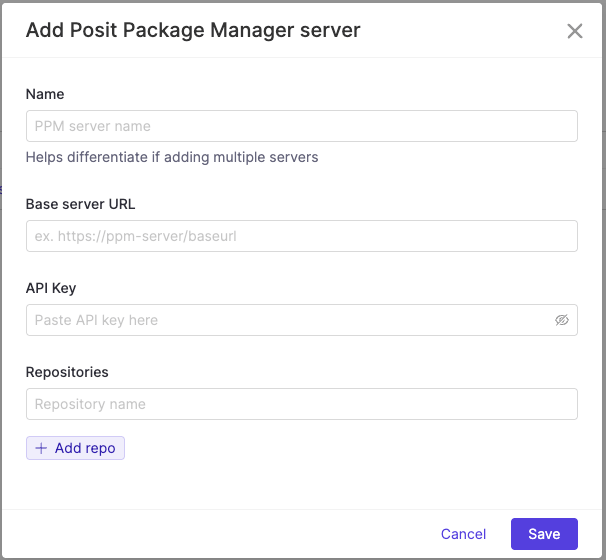
3
Optionally, restrict the searchable repositories
In the Repositories field, list the repository names you want users to search within. Leave it blank and users see snapshot results from every repository available on the server.